


Acrobat pathetic "help improve" bug
Hi,
I run Acrobat PRO JP2K Version 4.000.00000.52132 64-bit
Don't get me wrong, I love Acrobat products, but there's a very annoying bug in acrobat. Sometimes it opens in a "Help Improve Acrobat" and there is no way to get rid of the window:
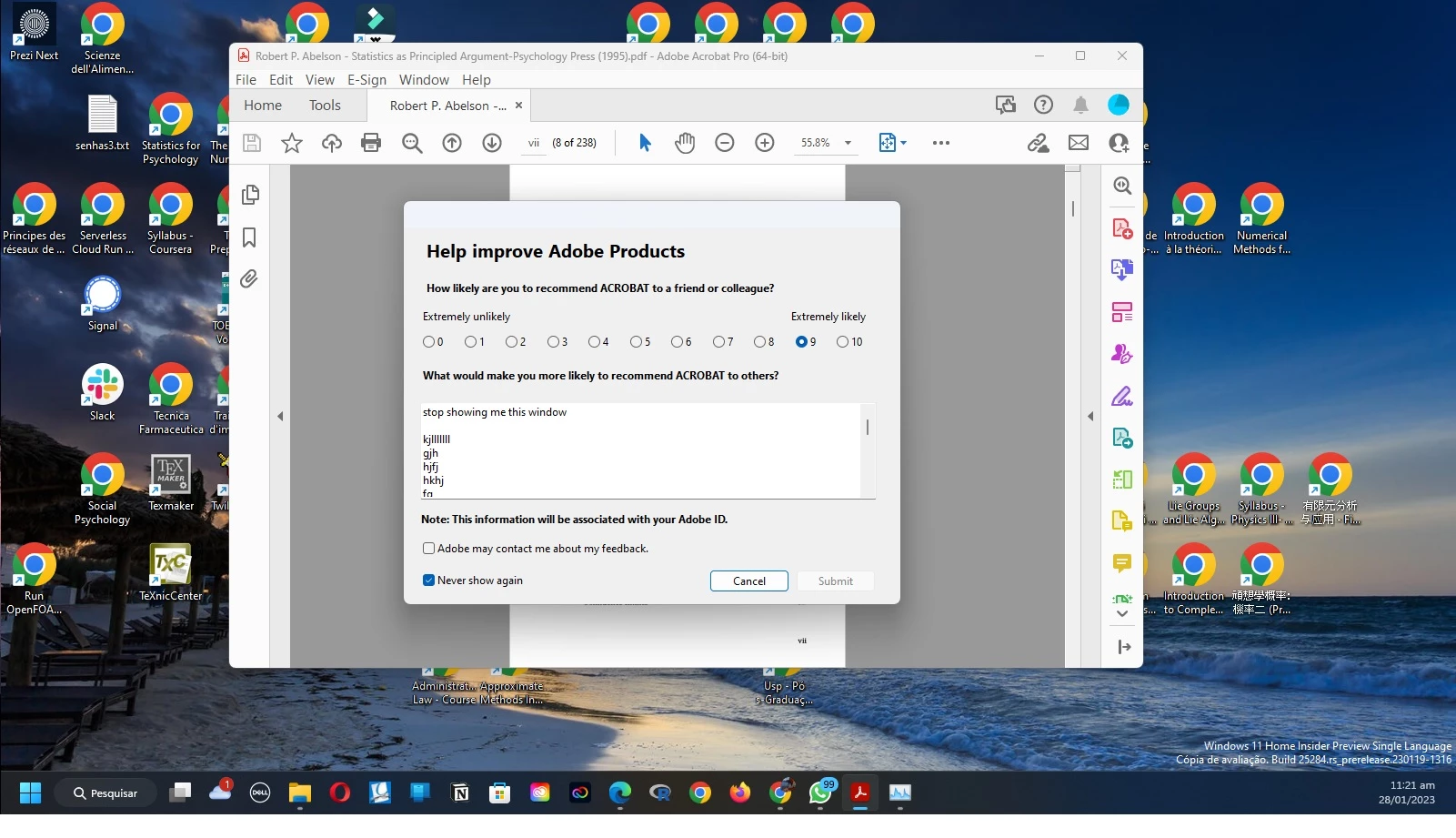
Usually I kill acrobat in the windows program manager and pray for it open without asking me again. I tried to write many things, perhaps it wont let me go without hearing what it wants to hear, but I had no success. Any tip?
Account Detail:
User Rights: Admin
User Account Control: Limited
Process Integrity: Low
Profile Type: None
Acrobat Detail:
Sandboxing: On
Protected View: Off
Captive Reader: No
Multi-Reader on Desktop Support: Off
Applications Installed:
Office Version: Office 2016 64-bit
Outlook Version: Outlook 2016 64-bit
Available Physical Memory: 470808 KB
Available Virtual Memory: 135286729964 KB
BIOS Version: DELL - 2
Default Browser: C:\Program Files\Internet Explorer\iexplore.exe
Version: 11.00.25284.1000 (WinBuild.160101.0800)
Creation Date: 2023/01/20
Creation Time: 6:39:37 am
Default Mail: Microsoft Outlook
mapi32.dll
Version: 1.0.2536.0 (WinBuild.160101.0800)
Display Detail:
Screen Width: 1366
Screen Height: 768
Number of Monitors: 2
Number of Mouse Buttons: 16
Has Mouse Wheel: Yes
Has Pen Windows: No
Double Byte Character Set: No
Has Input Method Editor: Yes
Inside Screen Reader: No
Graphics Card: Intel(R) Iris(R) Xe Graphics
Version: 31.0.101.3368
Check: Not Supported
Installed Acrobat: C:\Program Files\Adobe\Acrobat DC\Acrobat\Acrobat.exe
Version: 22.3.20310.0
Creation Date: 2022/12/24
Creation Time: 1:44:04 am
Locale: Inglês (Mundo)
Monitor:
Name: Intel(R) Iris(R) Xe Graphics
Resolution: 1366 x 768 x 60
Bits per pixel: 32
Monitor:
Name: Intel(R) Iris(R) Xe Graphics
Resolution: 1600 x 900 x 60
Bits per pixel: 32
OS Manufacturer: Microsoft Corporation
OS Name: Microsoft Windows 10
OS Version: 10.0.25284
Page File Space: 17269100 KB
Processor: Intel64 Family 6 Model 140 Stepping 1 GenuineIntel ~1382 Mhz
Session Detail:
Boot Type: Normal
Is Shutting Down: No
Network: Available
Inside Citrix: No
Inside VMWare: Yes
Remote Session: No
Remote Control: No
Using JAWS: No
Using ZoomText: No
Using Windows-Eyes: No
Using NVDA: No
System Name: LAPLACE
Temporary Directory: C:\Users\apmar\AppData\Local\Temp\acrobat_sbx\
Time Zone: Hora oficial do Brasil
Total Physical Memory: 8108840 KB
Total Virtual Memory: 137438953344 KB
User Name: apmar
Windows Detail:
Tablet PC: Yes
Starter Edition: No
Media Center Edition: No
Slow Machine: No
Windows Directory: C:\WINDOWS
C:\Program Files\Adobe\Acrobat DC\Acrobat\plug_ins\Accessibility.api
Version: 22.3.20310.0
Creation Date: 2022/12/24
Creation Time: 1:44:08 am
C:\Program Files\Adobe\Acrobat DC\Acrobat\plug_ins\AcroForm.api
Version: 22.3.20310.0
Creation Date: 2022/12/24
Creation Time: 1:44:08 am
C:\Program Files\Adobe\Acrobat DC\Acrobat\plug_ins\Annots.api
Version: 22.3.20310.0
Creation Date: 2022/12/24
Creation Time: 1:44:08 am
C:\Program Files\Adobe\Acrobat DC\Acrobat\plug_ins\DigSig.api
Version: 22.3.20310.0
Creation Date: 2022/12/24
Creation Time: 1:44:08 am
C:\Program Files\Adobe\Acrobat DC\Acrobat\plug_ins\IA32.api
Version: 22.3.20310.0
Creation Date: 2022/12/24
Creation Time: 1:44:08 am
C:\Program Files\Adobe\Acrobat DC\Acrobat\plug_ins\PPKLite.api
Version: 22.3.20310.0
Creation Date: 2022/12/24
Creation Time: 1:44:08 am
C:\Program Files\Adobe\Acrobat DC\Acrobat\plug_ins\Updater.api
Version: 22.3.20310.0
Creation Date: 2022/12/24
Creation Time: 1:44:08 am
 AdChoices