Participant
July 2, 2026
Question

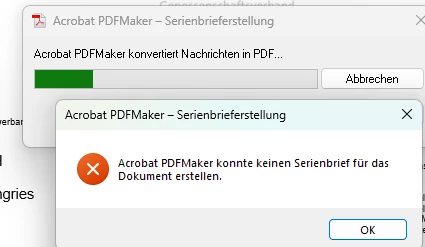
Acrobat PDFMaker Mail Merge (Serienbrief) in Word fails with error

  • July 2, 2026
  • 1 reply
  • 4 views

Hello,

we are having an issue with the mail merge feature in Microsoft Word using Adobe Acrobat Pro.

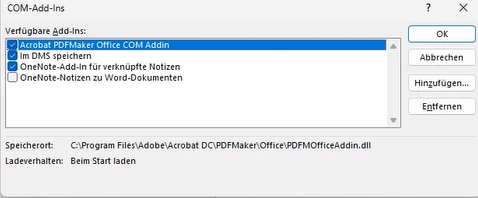
The Acrobat PDFMaker Office COM Add-in is active in Word, and we are using Adobe Acrobat Pro version 2026.001.21662. Acrobat is already updated to the latest available version.

We have tried this with several different Word mail merge documents. We also created a very simple test mail merge document using an Excel file with two columns: Name and Email. However, the process always fails with the same error message.

We have also already tried disabling and re-enabling the Acrobat PDFMaker add-in in Word, but the issue still occurs.

Has anyone experienced this problem or does anyone have an idea why the Adobe PDFMaker mail merge function is failing? We need to send around 800 personalized mail merge letters by email, so this function would be extremely helpful for us.

Thank you in advance for any suggestions or solutions.
LG Leon


    1 reply

    Meenakshi0101
    Community Manager
    Community Manager
    July 2, 2026

    Hi leon_9935,


    Thank you for reaching out, and sorry to hear you're running into this issue.


    Please update the application to the latest version available, then check whether you still experience the same behaviour. In Acrobat, go to Menu > Help > Check for updates. You can also refer to the following help page to check the latest updates available: https://adobe.ly/4xVN5TT


    If the issue still occurs, please try the following:

    1. Re-register the PDFMaker add-in

    • Close all Office applications.

    • Run Repair Installation in Acrobat.

    • Reopen Word and verify that Adobe PDFMaker Office COM Add-in is listed under File > Options > Add-ins > COM Add-ins.

    1. Test with Outlook

      If you are using the mail merge option that emails PDFs, ensure a supported Outlook desktop client is installed, configured, and set as the default mail application. PDFMaker mail merge functions may fail if Outlook is not properly configured or if Word cannot access it during the merge process.

    2. Check for Office Protected View or security restrictions

      Save the Word document and Excel data source locally on the desktop. Avoid using files opened from network locations, SharePoint sync folders, or cloud storage while testing.

    3. Run Word and Acrobat with the same permissions

      If Acrobat is running as Administrator but Word is not (or vice versa), COM communication can fail. Close both applications and restart them normally.


    If the issue still occurs after trying these steps, please let us know.


    Thanks,

    Meenakshi