
Participant
March 5, 2024
Question

Acrobat PDFMaker Office COM error

  • March 5, 2024
  • 3 replies
  • 16841 views

Have a user who gets error message each time they launch MS Word:

“Custom UI Runtime Error in Acrobat PDFMaker Office COM Addin. (X) An error occurred while calling the callback: “GetImage.”
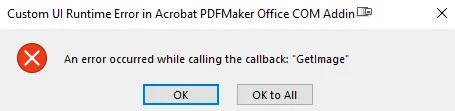


This is a Windows 11 (22H2) device with Acrobat DC 23.008.20555 and Microsoft 365 Apps for enterprise - en-us 16.0.17126.20190 installed.  We have tried repair of both Acrobat and Office.  When that didn't work, uninstalled Acrobat and ran AdobeAcroCleaner_DC2021, then reinstalled. Still no joy.  Any solutions short of creating a new profile for the user or rebuilding on a new image?

3 replies

Participant
April 9, 2025

april 9 2025- i have this issue after windows 11 - this is maddening!  for the cost, can't adobe FIX IT

S_S
Community Manager
Community Manager
May 19, 2025

Hi @16164260,


Hope you are doing well. Sorry for your experience with Adobe PDFMaker.


If you still experience the issue, you might want to try the steps below:


Go to  Computer\HKEY_CURRENT_USER\Software\Adobe\Adobe Acrobat\DC\AVAlert\cCheckbox

Create a DWord iAlwaysEnablePDFMAddin and change the value to 1.


Note: While you do this, make sure that the Acrobat and Office Apps are closed.


Let me know if this works.


Regards,
Souvik.

Participant
March 28, 2024

I've had this same issue ever since Adobe Acrobat was installed 2 1/2 years ago.  Every MS Office app returns this message upon pressing the "Insert" button for any reason. Installed is the stand alone Acrobat 2020 (20.005.30574), Windows 10 Pro, & MS 365 apps for enterprise. All are up to date. 


None of Amal's solutions fix it.  We have also uninstalled both MS Office & Acrobat, reinstalled Office without the Acrobat add-in. Re-installed Acrobat.  Acrobat says no updates available.

The pdf maker works. But this message is very annoying.  Any ideas anyone??

Thanks, sheryn

Amal.
Community Manager
Community Manager
April 1, 2024

Hi there,


Do you have any add-ins installed for MS office ribbon, if yes, please try to remove it and see if that works.
https://answers.microsoft.com/en-us/msoffice/forum/all/error-message-getimage/7e9b4d9d-c098-4621-9d88-378e8d017d67


Let us know how it goes.


~Amal

Participant
April 1, 2024

I disabled the Adobe COM add-in from within MS Word, and then did it separately in Powerpoint.  That works-the error message disappears.  I can't remove it for the whole office suite because I need admin privileges which I don't have on my office computer.  So the problem is definitely the Adobe PDFMaker Office COM  Addin.   Does Adobe have an updated DLL file or a fix? 

Thank you,

s

Amal.
Community Manager
Community Manager
March 19, 2024

Hi there


Hope you are doing well and sorry to keep you waiting.


It seems to be some issue with MS, please go through the discussion i found on MS help page :  https://adobe.ly/490Mqmn; and see if that works.


~Amal

lwfjaxAuthor
Participant
March 19, 2024

Comes up "Thread Not Found".

Amal.
Community Manager
Community Manager
March 20, 2024

Hi there


We are sorry to hear that, please try the troubleshooting steps provided here Troubleshoot Acrobat PDFMaker issues in Microsoft Office on Windows and check if that helps.


Also, make sure you have the recent version 24.01.20604 installed. Go to Help > Check for updates and reboot the computer once.

Try to repair the installation from the help menu (Win Only) and see if that works.


Let us know how it goes.


~Amal