


Participant
March 20, 2023
Resuelto

Acrobat PDFMaker was not able to mail merge the document

  • March 20, 2023
  • 12 respuestas
  • 39282 visualizaciones

As the title suggests, I am running into this error and cannot get this feature to work no matter what I try.
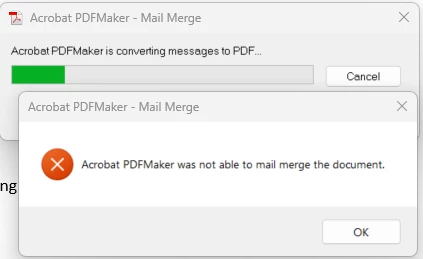
 

My operating systems and applications are fully up-to-date at the time of this posting. The versions of my operating system and related applications are as follows:

  • Windows 11 Enterprise, 64-bity, 22H2, OS Build 22621.1413
  • Adobe Acrobat Pro, Continuous Release | Version 2023.001.20064 | 64-bit
  • Microsoft Word for Microsoft 365 MSO (Version 2302 Build 16.0.16130.20298) 64-bit
  • Microsoft Excel for Microsoft 365 MSO (Version 2302 Build 16.0.16130.20298) 64-bit
  • Microsoft Visual C++ 2015-2019 Redistributable (x64) - 14.29.30139


To eliminate the possibility of a specific Word document or Excel datasource being the issue, I created a very basic and straight-forward test mail merge and datasource and am still running into the issue.


Installing Microsoft Visual C++ 2015-2019 Redistributable (x64), as recommended in a few other Adobe Support articles I found did not correct the issue.


I've also enabled logging and haven't found any useful information, as it appears to suggest its completing successfully even through it is not. Below are the outputs of the logs:


PDFMWord.log:

Mon Mar 20 11:30:18 2023 [INFO]: VBA::InitializePDFMakerDLL:Initialization of PDFMaker DLL started...
Mon Mar 20 11:30:18 2023 [INFO]: VBA::InitializePDFMakerDLL:Initialization of PDFMaker DLL Successfully Completed.
Mon Mar 20 11:30:18 2023 [INFO]: VBA::ShutdownPDFMakerDLL:Release pointers of PDFMaker DLL's.
Mon Mar 20 11:30:36 2023 [INFO]: VBA::PDFMakerConvertUsingSettings:PDFMWord to PDF conversion workflow started...
Mon Mar 20 11:30:36 2023 [INFO]: VBA::InitEverything:Initialization Started...
Mon Mar 20 11:30:36 2023 [INFO]: VBA::InitializePDFMakerDLL:Initialization of PDFMaker DLL started...
Mon Mar 20 11:30:36 2023 [INFO]: VBA::InitializePDFMakerDLL:Initialization of PDFMaker DLL Successfully Completed.
Mon Mar 20 11:30:36 2023 [INFO]: VBA::SetAppLanguage:Set PDFMaker Language Started.
Mon Mar 20 11:30:36 2023 [INFO]: VBA::SetAppLanguage:Set PDFMaker Language Completed.
Mon Mar 20 11:30:36 2023 [INFO]: VBA::InitEverything:Initialization Successfully Completed.
Mon Mar 20 11:30:36 2023 [INFO]: VBA::PDFMakerConvertUsingSettings:Log events corresponding to review/Share button click Info.
Mon Mar 20 11:30:36 2023 [INFO]: VBA::ConvertToPDFEx:Started Convert to PDF workflow...
Mon Mar 20 11:30:36 2023 [INFO]: VBA::PrintingEntryWithNoOptionsDlg:Initialization of PDFMWord was successful, now ready to start CreatePDFFile workflow.
Mon Mar 20 11:30:36 2023 [INFO]: VBA::CreatePDFFile:Creation Of PDF Started...
Mon Mar 20 11:30:36 2023 [INFO]: VBA::CreatePDFFile:Current Active Doc Font is Office Font.
Mon Mar 20 11:30:36 2023 [INFO]: VBA::GetFinalPDFFileName:Get PDF File Name.
Mon Mar 20 11:30:36 2023 [INFO]: VBA::Preprocess:Preprocessing for EMF started...
Mon Mar 20 11:30:36 2023 [INFO]: VBA::Preprocess:Preprocessing for EMF Successfully Completed.
Mon Mar 20 11:30:36 2023 [INFO]: VBA::GetFinalPDFFileName:Get PDF File Name.
Mon Mar 20 11:30:36 2023 [INFO]: VBA::CreatePDFFile:Successfully Got EMF.
Mon Mar 20 11:30:36 2023 [INFO]: VBA::ShutdownPDFMakerDLL:Release pointers of PDFMaker DLL's.
Mon Mar 20 11:30:36 2023 [INFO]: VBA::ConvertToPDFEx:Convert to PDF workflow Completed.


PDFMEngine.log:

Mon Mar 20 11:30:36 2023 [INFO]: PDFMEngineImpI::PDFMEngineConvertDoc:Doc To Pdf conversion has started.
Mon Mar 20 11:30:36 2023 [INFO]: PDFMDocExporter::convert:Doc To Pdf conversion has started.
Mon Mar 20 11:30:36 2023 [INFO]: WordExporter::doExport:Word Exporter Workflow has started...
Mon Mar 20 11:30:36 2023 [INFO]: WordExporter::doExport:Word Exporter Workflow has Ended Successfully.
Mon Mar 20 11:30:36 2023 [INFO]: PDFMDocExporter::convert:Doc To Pdf conversion has ended with return value 4 .
Mon Mar 20 11:30:36 2023 [INFO]: PDFMEngineImpI::PDFMEngineConvertDoc:Doc To Pdf conversion has successfully completed.
Mon Mar 20 11:30:36 2023 [INFO]: PDFMEngineImpI::PDFMEngineConvertDoc:PDFMEngine Workflow has Completed with return value 4 .


Furthermore, the issue seems to only be present with the Merge to Adobe PDF/Mail Merge function within Microsoft Word. All other functions of Adobe PDF Maker within Microsoft Word are working as intended.

Mejor respuesta de Wes28508813bswq

I'm having this issue and it's now June 2025. None of the solutions suggested here work. I can save as Adobe PDF fine, but Mailings -> Merge to PDF fails with the 'Acrobat PDFMaker was not able to mail merge the document' error. I don't know where to go from here.


A couple of hours later (not counting the 3 hours I had already spent on it this week), and I managed to get it working (for now). I had to run Word as administrator, go to Options -> Add-ins, Manage COM Add-ins ->Go. them remove the Acrobat PDFMaker Office COM Addin. Closed and re-opened Word as administrator again, followed the steps above except this time pressed Add (on the Add a COM Add-ins). then had to browse through C:\ to where PDFMOfficeAddin.dll was located (the location may differ on your computer depending on which Adobe product you have). Once I added the COM add-in back in, I was able to Mail Merge to PDF again. I have no idea why this worked or why Adobe engineers are still working on a fix. I also don't know if this fixed it permanently, only time will tell. Hope this helps someone, that error message is so poor, it tells the user nothing.

12 respuestas

Participant
October 8, 2024

Hi all,


I faced this problem too and found a solution for my setup:

Microsoft® Word for Microsoft 365 MSO (Version 2409 Build 16.0.18025.20030) 32-bit
by changing the 'Theme Fonts'.


Go to the tab Design>Fonts>Office - Arial (Arial, Arial).


You should now see the Theme Fonts set as Arial (Headings) and Arial (Body) in the 'Home' tab.


I suspect it is because Adobe does not support the Aptos font.


Hope that helps.

Participating Frequently
October 8, 2024

Thanks Eugene! I will check it out and report back!


Participant
September 24, 2024

Having this same issue with users here. 

Was working fine, then suddenly stopped working. 2 freshly reimaged devices and it would not work.

I tried with the file son my own device and it worked fine( is it a matter of time until it breaks?), log into the loaned device after receiving it back with my credentials and it won't work.


Participant
July 2, 2024

Hi,

We are still having issues with this, is there any update or timeline on when this will be resolved? 

Kind regards,

Tony

Participating Frequently
July 2, 2024

So the "answer" is to sign out of Office 360 to make it work? It started working fine until my work upgraded to Windows 11 and that version of Outlook wasn't sending them, I had to click back into my older Outlook and I saw all the files in the outbox pending to be sent, once I logged back in it sync'd and all the mailmerge PDFs sent....2 weeks AFTER i created them....


Participant
May 22, 2024

The community needs an answer to this error. This has been an issue for over a year and still no viable workaround. I have tried all the suggestions in the thread and none of them have worked. Up until this week I have been using mail merge for 2 years with no issues. Now all of the sudden it wont complete. Amal and Adobe, please provide the community with a fix for this error. Otherwise I plan on canceling my subcription. 

Participant
June 13, 2024

I'm sharing your frustrastions since this has been a known issue for so long.  We use the latest Word 365 version and the "Merge to Adobe PDF" function will not even complete the print step anymore (see screenshots).  My group relies on converting and emailing merges to streamline our workload.  If we can't perform this task it will add hours to what would otherwise take minutes.   We would likely need to add additional staff hours to makeup the time.  Like most organizations we will just have to find a different solution with a different vendor if Adobe cannot fix this.  It's too bad since this is exactly the type of tool we rely on.


First Error.

Second Error:


Amal.
Community Manager
Community Manager
June 14, 2024

Hi there


Its still work under progress, as our engineering team is working actively on it.


We will update you as soon as we get any information.


Thanks for your understanding


~Amal

Participant
January 17, 2024

Hi All,

I tested this and works as an alternative solution. 

1. After open the mailmerge word document, click sign out on the top right corner.

2. After sign out, you will be able to mailmerge

3. After mailmerge complete, you require to sign in back to O365 to maintain your office activation

Participant
January 31, 2024

I had tried a lot of things, but only this one worked. Thank you very much for your valuable solution!

Participant
December 18, 2023

Hi Adobe support team,


Do you have an ETA on when the fix for this issue is likely to be released please? I notice that it is not listed as being fixed in the December 2023 update.


In addition, I'm confused why this issue is not listed as a known issue on the following page, are you able to advise please? - https://helpx.adobe.com/uk/acrobat/kb/known-issues-acrobat-dc-reader.html 


Many thanks,

Leigh.

Amal.
Community Manager
Community Manager
December 21, 2023

Hi there


We do not have a fixed timeline as the work is still under progress, we will share the update as soon as we get any information.


Thanks for your time and patience


~Amal

Participant
December 4, 2023

Hi, 


Is there any update on a fix for this please? This is really hindering my work, and has been going on for a long time now so it would be really great if we could have an update. 


Thank you.

Participant
December 4, 2023

Hello - It would be GREAT if this function could be fixed.  It's an extremely important part of my day-to-day.


There has not been a satisfactory workaround.

Amal.
Community Manager
Community Manager
December 5, 2023

Hi there


Our engineers are working on the issue and the fix will be available in future updates.


Thanks for your time and patience on this so far.


~Amal

foor97466515
Participant
November 24, 2023

Has adobe release a fix for this 

Amal.
Community Manager
Community Manager
November 24, 2023

Hi there


This issue is still in progress with our engineering team.


We will share the update as soon as get any information.


Thanks for your time and patience so far.


~Amal

Participant
November 14, 2023

One of my colleagues in office have this exact same issue. Our Company has been using MS Office365 product and user has been using Adobe Acrobat DC Standard but she has been facing this issue while using Mail/Merge functionality.


"Error: Acrobat PDFMaker was not able to mail merge the document"


As a workaround that I have figured out that Mail/Merge option is not working with MS Office365 product so I have installed MS Office 2016 Suite on her machine with Adobe Acrobat DC STD installed, she is now able to use Mail/Merge functionality like before.

I would like to see if Adobe is able to fix this issue with Office365 product as our company is primarily on Office365 Suite.

Participant
November 17, 2023

Any updates on this fix?  I am having the same issues. The workarounds are not plausible as I am trying to mail merge PD certificates from a training event and I can't do those individually as I will be here all day. I am a staff of one and have spent the last 3 days trying to figure this out. 

Participant
November 17, 2023

Hello and the fix was for I.T. to (re)install MS Office 2016 for me.  It appears that you are using it for the same purpose as I am .. CE Certificates.  It's been an issue not only for me but others as well.  It would be nice if Adobe could fix this problem.

Participant
October 19, 2023

Hey everyone, I am the original poster of this thread and I am absolutely blown away at how many replies there are! I am happy to hear that I am not alone in experiencing this issue. I’ve tested it again today (10/19/2023) and things still appear to be broken.

In the event you've come across this posting and you desperately need a mail merge in individual PDFs, I would like to share a better-than-nothing workaround:


  1. Within Microsoft Word on a document that is ready to merge and has a data source, select Finish & Merge > Edit Individual Document
  2. This will perform the merge and open a new Word document. Save the new (merged) document that opens up as .docx.
  3. Once the .docx of the merge is saved, this enables you to use the File > Save As Adobe PDF.
  4. Once the PDF of the merge has been saved, you can then use Adobe Acrobat to edit the PDF and save individual pages. This is performed by using the Organize Pages feature found in Tools, selecting the desired pages, and either using the Extract feature (if the merge documents are only a single page) or the Split feature (if the merge documents are more than one page long each, as you can specify the number of pages).

    Although the file names may be challenging to indentify the documents apart, if you understand the order that the mail merge was performed in, you should be able to sort by that same order within your data source and correspond the numbers on the filenames with the rows of the data (and just -1 on the row number if you have column headers). Again, not the most ideal, but definitely better than nothing.

    I hope this helps!
Participant
October 24, 2023

Hi, 


I've been having the same issue for weeks now, so this is really helpful.


You seem very computer literate so wondering if you can help - do you know if there is a way to send each of the individual documents to individual email addresses? When i usually mail merge to PDF from word, each document is usually linked with an email address, so although this has helped to create the documents, i wondered if you knew a way to then send them all to their individual email addresses?


Hope this makes sense, I am not the most technical of people!


Thanks in advance.

Participant
November 14, 2023

Hello and thank you to all in the thread.  I'm glad I'm not alone and completely unsavvy.  Katie (above) ask the same question that I have.  Anyone?!?!