

K A T
Participant
February 2, 2024
Question

Acrobat Prepare a form won't update the name in text box

  • February 2, 2024
  • 3 replies
  • 916 views

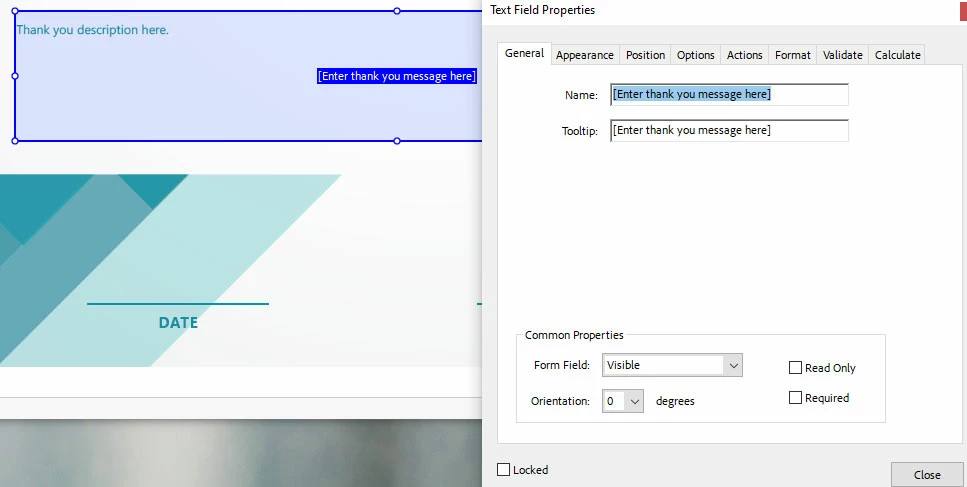
In Acrobat, the prepare a form text field properties<general<name is not updating in the text box.


This happen a few times and am unsure how to fix it without trying to create a new text box. Is there a way to get the new information updated in the text field?
This topic has been closed for replies.

3 replies

try67
Community Expert
Community Expert
February 2, 2024

The contents of the field have nothing to do with its name, nor the tooltip.

You can set the default value of the field under the Options tab, and then reset the form to display that value.

But as mentioned, do not use punctuation marks in the field name. It's not a good idea.

Thom Parker
Community Expert
Community Expert
February 2, 2024

I would strongly suggest using shorter, more reasonable names that do not inlcude puntuation characters. 

For example, the field above should be named "ThankyouMessage"


But, why do you care about the field name anyway?  What are you using it for?


Thom Parker - Software Developer at PDFScriptingUse the Acrobat JavaScript Reference early and often
K A T
K A TAuthor
Participant
February 5, 2024

It is requested for the job. Have spelled out text with spaces and puntuation. 

Thom Parker
Community Expert
Community Expert
February 5, 2024

Are you under the impression that the field name is displayed in the field?  It is not, the field name and it's value are separate things. The field name is used to reference the field in scripts. The field value is the text displayed in the field. 


If you want some default text displayed in the field, then look on the Options tab of the field properties dialog.  


If you are looking for something else, then please, clearly explain the behavior you would like to see on the form.  


Thom Parker - Software Developer at PDFScriptingUse the Acrobat JavaScript Reference early and often
Bernd Alheit
Community Expert
Community Expert
February 2, 2024

What want you change?