Inspiring
March 1, 2019
Question

Acrobat Printing Double-Sided in spite of OS settings

  • March 1, 2019
  • 1 reply
  • 1141 views

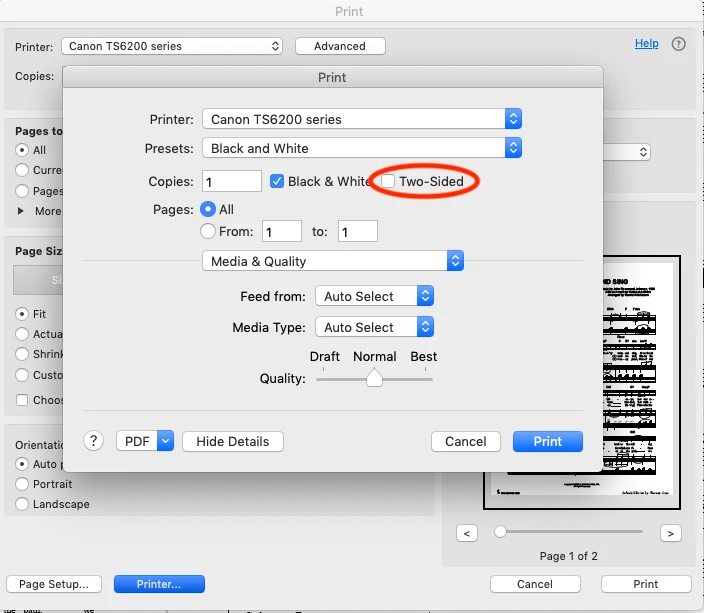
Acrobat was refusing to respect my desire for single-sided prints, despite "2-sided" being unchecked in the Printer's dialog.

Solution: check and uncheck the setting from within Acrobat:

Print>Printer>(dismiss warning)>check/uncheck 2 Sided

Although every other app was printing single-sided, Acrobat didn't recognize the setting until it was done from within Acrobat.
Mojave (new), Canon duplex printer (2-sided capable)

This topic has been closed for replies.

1 reply

jonburrAuthor
Inspiring
March 13, 2019

You have to do this EVERY TIME you print a new job after restarting the application. Acrobat Pro does not retain this setting..

Abambo
Community Expert
Community Expert
March 13, 2019

jonburr  wrote

You have to do this EVERY TIME you print a new job after restarting the application. Acrobat Pro does not retain this setting..

That's how defaults are defined. What you edit there is the printer's dialogue. Your default seams to be for duplex printing.

ABAMBO | Hard- and Software Engineer | Photographer
jonburrAuthor
Inspiring
March 13, 2019

No, this is a bug. The default is defined in the OS print dialog. 2-sided remains unchecked, and all other apps respect it.

The OS dialog 2-sided checkbox has to be checked, then unchecked from within Adobe Acrobat Pro whenever the app is restarted.