


Participant
July 26, 2022
Answered

Acrobat Pro 2020 opens endless notepad messages when you attemp to print an enrypted PDF

  • July 26, 2022
  • 4 replies
  • 5881 views

I know re-distiling an Encrypted PDF is not supported. My issue is the fact the Adobe doesn't just print a single message but will open what seem to be endless copies of Notepad notifying you of this fact.


9 times out of 10 this will continue until the system runs out of memory and the user is required to do a hard reboot.


If I can get CMD open on the system multiple TASKKILL /F /FI "Notepad.exe" will get things working again until Adobe stops the spam.


Is there any way to stop this. I realize what the user(s) are doing isn't supported. But locking up the system isn't a suitable response.

Correct answer Jimmy McJimboface

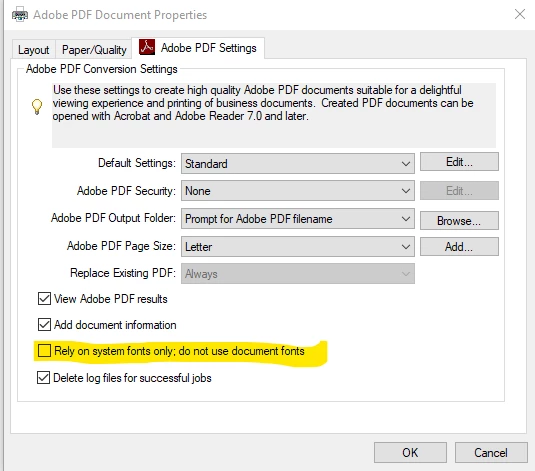
In my case when printing to "Adobe PDF", especially from Excel. I need to ensure that "Rely on system fonts only; do not use document fonts" is unchecked in the printer properties. Otherwise the application will spam my desktop with hundreds or thousands of notepad files opened on top of themselves. It's a real blunder, entirely frustrating, and from my understanding of tother posts this is "working as designed". The setting automatically resets on my system with every update lmao.


 <Unchek that thingy


4 replies

Participant
June 10, 2024

Participant
June 19, 2024

Same here, same error. Have tried multiple stations. Not sure how to resolve. 

Jimmy McJimboface
Jimmy McJimbofaceCorrect answer
Participant
June 20, 2024

In my case when printing to "Adobe PDF", especially from Excel. I need to ensure that "Rely on system fonts only; do not use document fonts" is unchecked in the printer properties. Otherwise the application will spam my desktop with hundreds or thousands of notepad files opened on top of themselves. It's a real blunder, entirely frustrating, and from my understanding of tother posts this is "working as designed". The setting automatically resets on my system with every update lmao.


 <Unchek that thingy


Participant
June 10, 2024

I have the same issue with the statements from the banks which I can not provide the example too, I understand that it should open the error once and stop the printing but it will open hundres of notepads with the error.

try67
Community Expert
Community Expert
July 27, 2022

This is not normal behavior. It usually only opens it once. Are you maybe trying to print it as a part of an Action? Also, what's your exact version of Acrobat, and OS?

Participant
July 27, 2022

I can reproduce the issue on my install as well. It is attempting to print encrypted PDF with alot of pages, not part of an action. File Print - Acrobat PDF driver.  Acrobat will spawn a large number of notepad windows with the message


"%%[ ProductName: Distiller ]%%
This PostScript file was created from an encrypted PDF file.
Redistilling encrypted PDF is not permitted.
%%[ Flushing: rest of job (to end-of-file) will be ignored ]%%
%%[ Warning: PostScript error. No PDF file produced. ] %%"


Like I said I get that you can't do that. It's the system crashing number of notepad instances that get spawned that is the issue.


OS: Windows 10 Version 21H2 (x64)

Acrobat: Acrobat Pro 2020 20.005.30362

try67
Community Expert
Community Expert
July 27, 2022

Can you share with us a sample file that causes this issue?

Bernd Alheit
Community Expert
Community Expert
July 27, 2022

The user can close Notepad.

Participant
July 27, 2022

I get that. The problem isn't that a single notepad instance is created. It just keeps on spawning them. Then the user is stuck playing wack-a-mole with Notepad until their system stops responding.