
Participant
May 14, 2021
Question

Acrobat Pro 2020 - Submit button ignores Java Script mailto: edits and Identity preferences update

  • May 14, 2021
  • 1 reply
  • 596 views

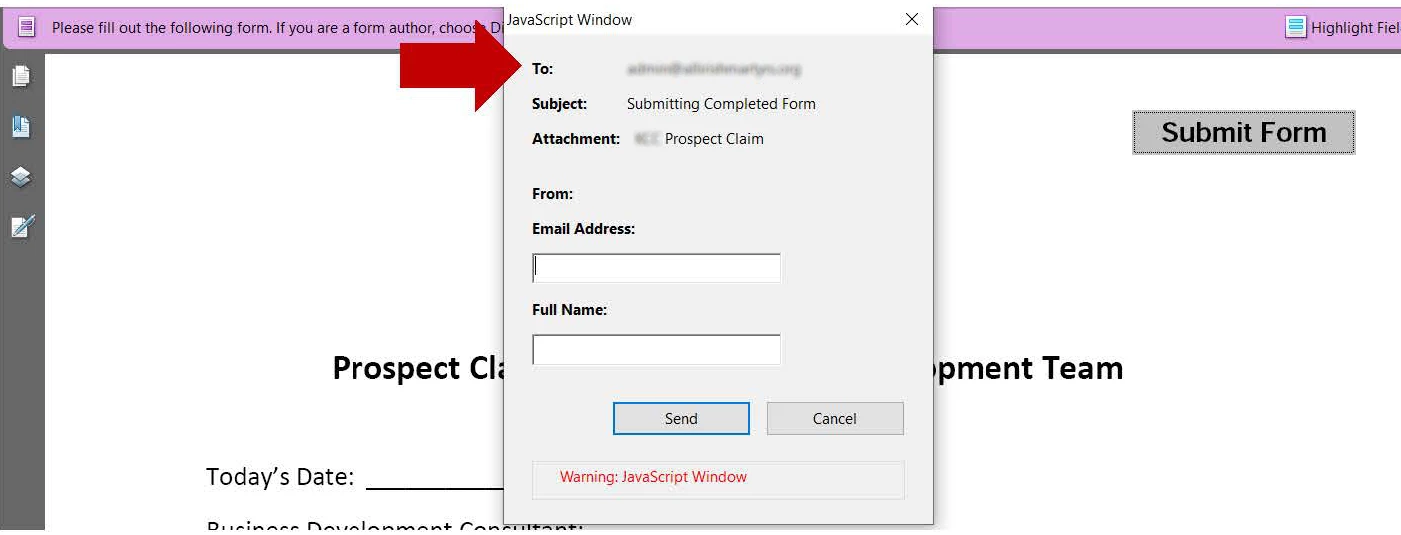
I created a form for a client that picked up the mailto information from a previous form I created for someone else.  I updated my Identity preferences to reflect the email I wanted use.  I then created the new form. When testing the Submit button it still showed the original mailto email, so I updated the java script (all mailto instances), however the form submission still shows the old email in the To: area. See image.

Note:  The Submit button was create by Acrobat when the form was Distributed.


How can I correct this?
This topic has been closed for replies.

1 reply

try67
Community Expert
Community Expert
May 14, 2021

This window seems odd. Usually when you add a Submit Form command it doesn't display this type of window.

You say the form was distributed. This might explain it. I would try to cancel this distribution and add a new Submit Button.

Participant
May 14, 2021

I actually didn't want a Submit button, it was added automatically by Acrobat when I clicked Distribute. I'll end up removing it, but wanted to see if I could find out why updating my Identity Preference and editing the Java Script didn't have the desired results.  Plus, he button very confusing for recipients of the form, since it doesn't funcion when the form opens in a browser.  Thanks so much for your reply!

try67
Community Expert
Community Expert
May 14, 2021

Can you share the file?


And unfortunately, it's not likely to work if opened in a browser. You must instruct the users to download the file and open it using Adobe Reader.