


Acrobat Pro 2020 - Unable to install - fresh PC
New Windows 11 PC - Acrobat Pro 2020 has not been installed yet.
Yesterday I tried to install Acrobat, but the sign window kept on popping up.
There was no way to get Acrobat installed - it would start and showed up in a split second and then showed the sign in window again.
I restored a Windows image that I created just before starting installing Acrobat.
So I start of with clean slate.
In some post a link was provided to the last 2020 versions.
https://helpx.adobe.com/download-install/kb/acrobat-2020-downloads.html
I downloaded the pro version. Went thru the setup, entered the license key, etc.
Then signed in. Okay, so far so good.
Launched Acrobat, a pop up showed up
(Freely translated)
“
Serial number upgrade
The serial number you entered is valid, but no eligible product can be found on this computer.
If you want to use the serial number you entered, you must have one of these eligible products.
Select the product you own and enter the corresponding serial number.
“
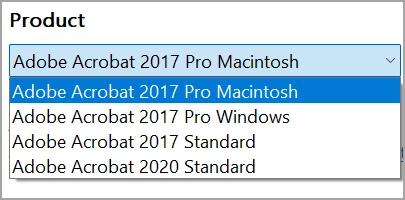
The key I have is valid for the 2020 Pro version.
I check above URL downloaded both .zip files - extracted them - and used Beyond Compare to compare the folders.
As far as I can see, both files and folders were identical.
Downloaded zip files (pro / std) were identical, same as the extracted folders.
Where to download the Acrobat PRO 2020 zip file?
Thanks!
 AdChoices