


Acrobat Pro 2025 on OS 15.1 not displaying certain fonts
OS: 15.1
Acro Pro: 2025.001.20432
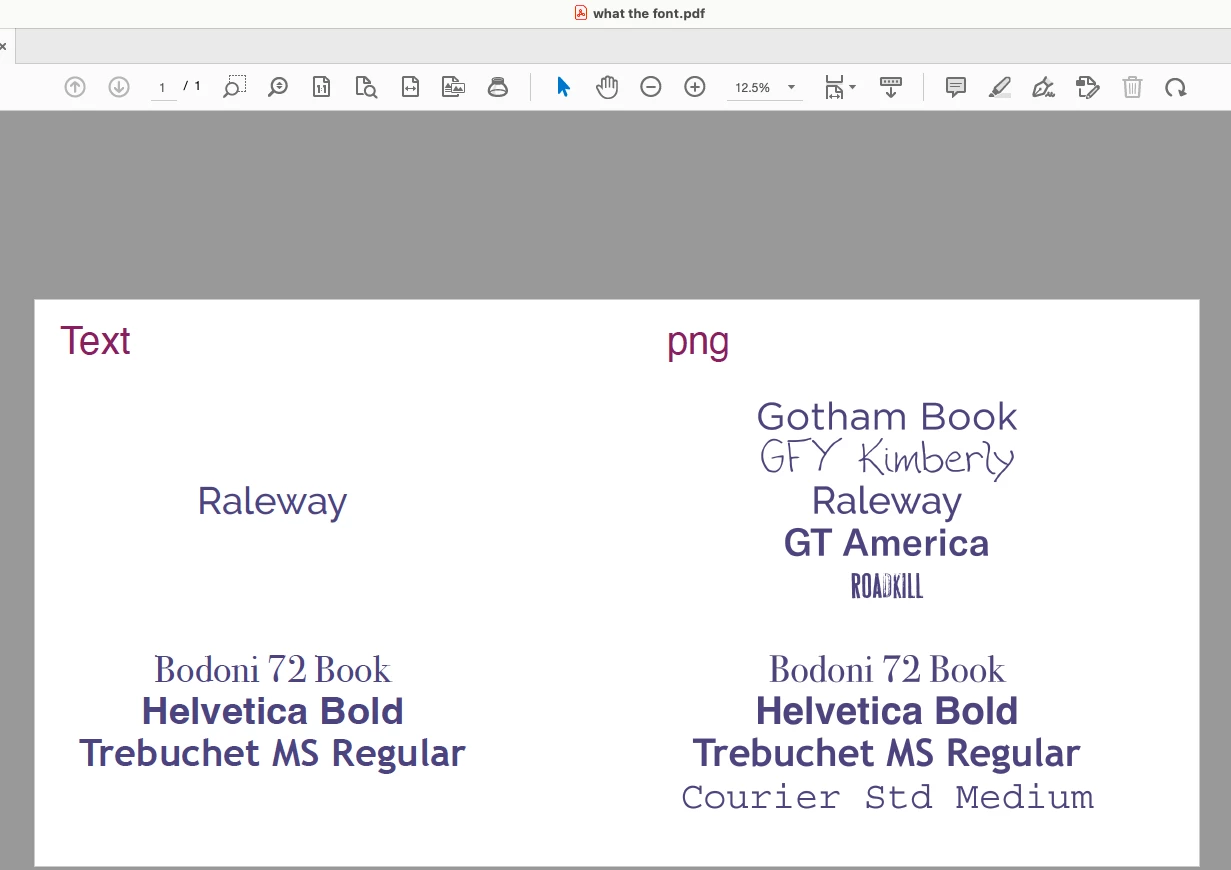
Certain system and non-system fonts do not display at all when viewing in Acrobat Pro 2025.001.20432 on OS 15.1. The affected PDFs were exported from either XD v57.1.12 or XD 58.0.12 (I know it's in maintenace mode but I'm stuck w/ it for now). This includes both legacy PDFs created weeks, months ago as well as newly created PDFs. The same fonts view fine when PDFs are exported form other Adobe apps such as ID, AI, etc. Some interesting facts.
OS 15.3
Acro Pro 2025.001.20432 does NOT view properly
Acro Reader 2025 does NOT view properly
Chrome views properly
WorkFront Proof views properly
Acro Pro 2024.004.20219 views properly
Windows 10 Enterprise 22H2
Acro Pro 2025.001.20432 views properly
Switching to "New" Acrobat does not correct the problem nor have numerous other setting changes and uninstall/reinstalls I have tried.
To illustrate, I've attached a screen grab of a simplified test file. On the left side you will notice the fonts that are missing as compared to the image on the right.
Looking for both a long term fix as well as a dmg of Acrobat 2024 as it is not available in CC. Thank you.

 AdChoices