
Answered
Acrobat Pro DC crashes attempting to create PDF using Microsoft Office 365
It's gone through Windows 10 Control Panel repair, uninstallation and reinstallation, but nothing helps. All attempts at creating a PDF file from the most recent iteration of Microsoft Office 365's Outlook or Word simply crash Acrobat Pro DC Version 2019.021.20049. One file-saving progress bar increment is seen, then poof! All signs of Acrobat disappear.
Trying it the other way around, a Word .docx file can be imported into Acrobat Pro DC, but this error occurs when a PDF is requested...
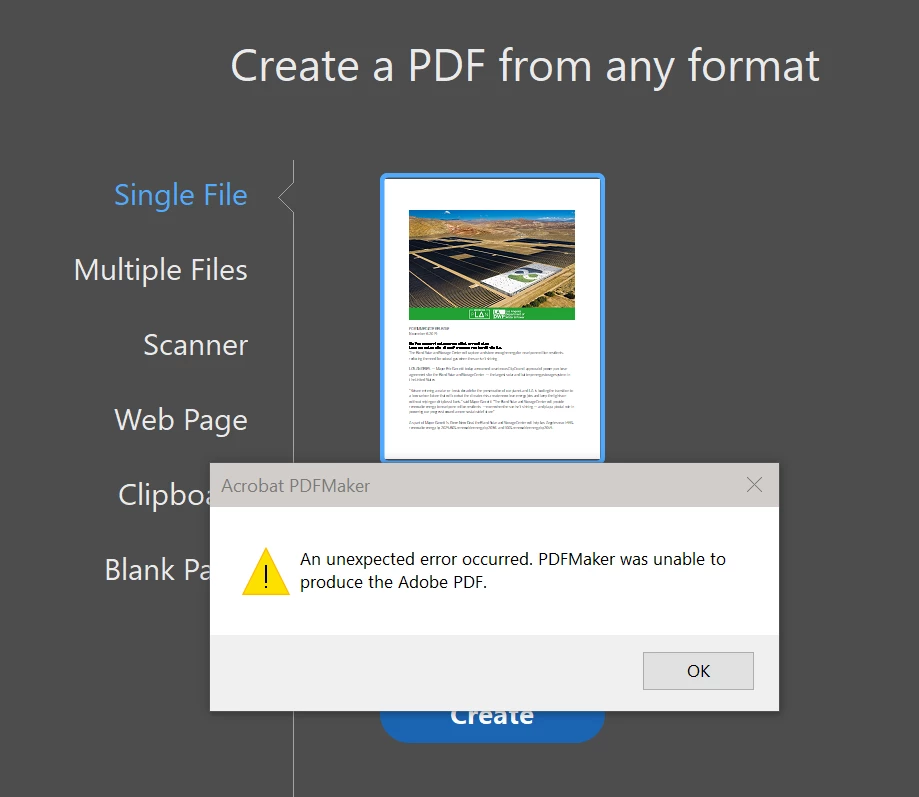
Office's settings indicate nothing unusual in COM Add-ins. Acrobat's PDFZMaker and Cloud are present and enabled, Anyone have a proven fix?
SYSTEM PARAMETER
Account Detail:
   User Rights: Admin
   User Account Control: Default
   Process Integrity: High
   Profile Type: None
Acrobat Detail:
   Sandboxing: Off
   Captive Reader: No
   Multi-Reader on Desktop Support: Off
Applications Installed:
   Office Version: Office 2016 64-bit
   Outlook Version: Outlook 2016 64-bit
Available Physical Memory: 4194303 KB
Available Virtual Memory: 3734964 KB
BIOS Version: AMD - 3242016
Default Browser: C:\Program Files\Internet Explorer\iexplore.exe
    Version: 11.00.18362.1 (WinBuild.160101.0800)
    Creation Date: 2019/03/18
    Creation Time: 10:21:39 PM
Default Mail: Microsoft Outlook
    mapi32.dll
    Version: 1.0.2536.0 (WinBuild.160101.0800)

Display Detail:
   Screen Width: 3840
   Screen Height: 2160
   Number of Monitors: 3
   Number of Mouse Buttons: 16
   Has Mouse Wheel: Yes
   Has Pen Windows: No
   Double Byte Character Set: No
   Has Input Method Editor: Yes
   Inside Screen Reader: No
Graphics Card: NVIDIA GeForce GTX 1080
    Version: 26.21.14.4097
    Check: Not Supported
Installed Acrobat: C:\Program Files (x86)\Adobe\Acrobat DC\Acrobat\Acrobat.exe
    Version: 19.21.20049.355013
    Creation Date: 2019/10/23
    Creation Time: 6:43:10 AM
Locale: English (United States)
Monitor:
    Name: NVIDIA GeForce GTX 1080
    Resolution: 1920 x 1080 x 144
    Bits per pixel: 32
Monitor:
    Name: NVIDIA GeForce GTX 1080
    Resolution: 3840 x 2160 x 60
    Bits per pixel: 32
OS Manufacturer: Microsoft Corporation
OS Name: Microsoft Windows 10
OS Version: 10.0.18362
Page File Space: 4194303 KB
Processor: AMD64 Family 23 Model 1 Stepping 1  AuthenticAMD  ~3394  Mhz
Session Detail:
   Boot Type: Normal
   Is Shutting Down: No
   Network: Available
   Inside Citrix: No
   Inside VMWare: No
   Remote Session: No
   Remote Control: No
   Using JAWS: No
   Using ZoomText: No
   Using Windows-Eyes: No
   Using NVDA: No
System Name: HQ3
Temporary Directory: C:\Users\MICHAE~1\AppData\Local\Temp\
Time Zone: Pacific Standard Time
Total Physical Memory: 4194303 KB
Total Virtual Memory: 4194176 KB
User Name: Michael Linder
Windows Detail:
   Tablet PC: No
   Starter Edition: No
   Media Center Edition: No
   Slow Machine: No
Windows Directory: C:\Windows

INSTALLED PLUG-INS
C:\Program Files (x86)\Adobe\Acrobat DC\Acrobat\plug_ins\Annots.api
    Version: 19.21.20048.354512
    Creation Date: 2019/10/16
    Creation Time: 12:27:40 PM
C:\Program Files (x86)\Adobe\Acrobat DC\Acrobat\plug_ins\IA32.api
    Version: 19.21.20047.354104
    Creation Date: 2019/10/16
    Creation Time: 12:27:40 PM
C:\Program Files (x86)\Adobe\Acrobat DC\Acrobat\plug_ins\Updater.api
    Version: 19.21.20047.354104
    Creation Date: 2019/10/16
    Creation Time: 12:27:40 PM
 AdChoices