
Participating Frequently
April 12, 2020
Answered

Acrobat Pro DC -- Is it posible to do batch conversion, or is the 'action' creation gone?

  • April 12, 2020
  • 3 replies
  • 2389 views

I guess no one ever uses Acrobat of any form at all these days.

There does not seem to be an obvious way to select multiple files, then have them converted with the selected output file format.

I have found some reference which indicate someone was wanting such in the recent past, like 2 years.

But there does not seem to be any widge icon for creating an action. It seems the interface has been made safe for idiots who would never use the tool to deal with more than one carefully crafted document at a time.

John Clark.
 

This topic has been closed for replies.
Correct answer JR Boulay

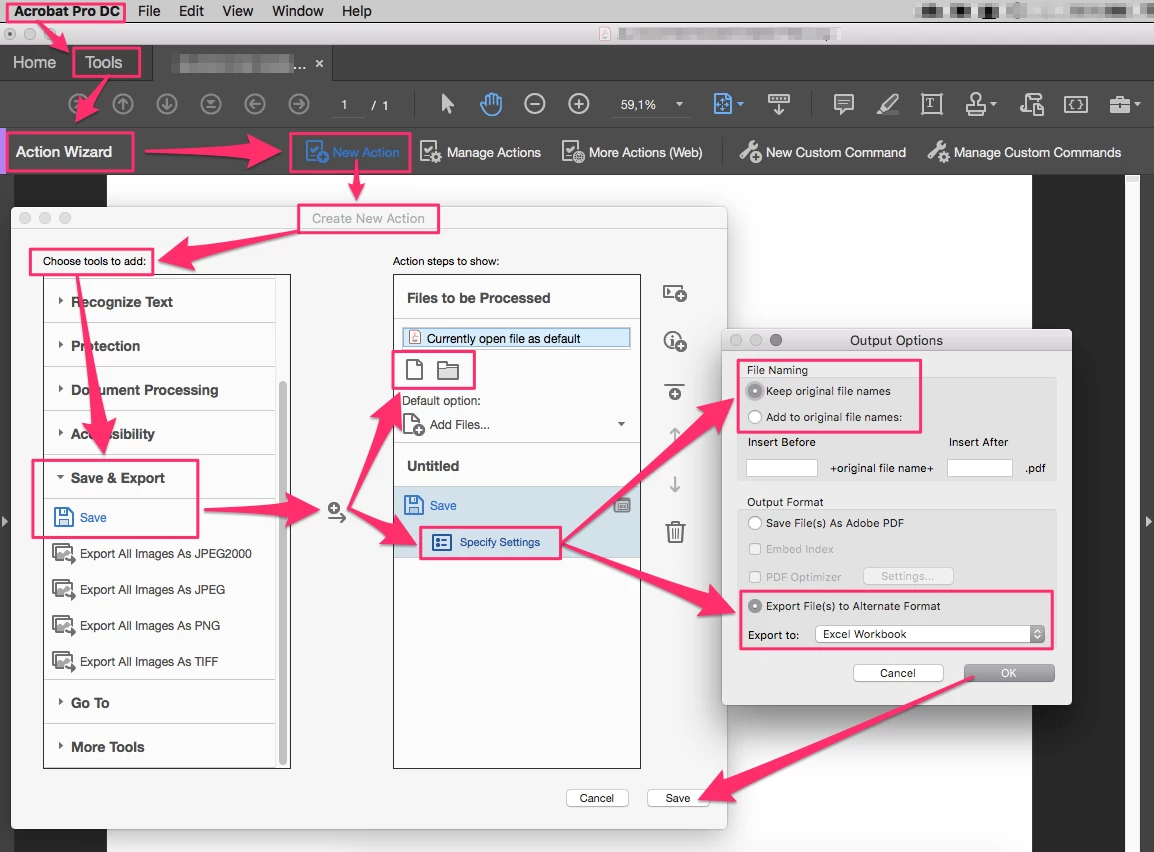
Hi,

Below is a tutorial for "idiots".

😉


The interface has changed but it is a function that has been in Acrobat Pro at least since version 5, more than 20 years ago.
Happy Easter !


3 replies

JR Boulay
Community Expert
JR BoulayCommunity ExpertCorrect answer
Community Expert
April 13, 2020

Hi,

Below is a tutorial for "idiots".

😉


The interface has changed but it is a function that has been in Acrobat Pro at least since version 5, more than 20 years ago.
Happy Easter !


Acrobate du PDF, InDesigner et Photoshopographe
Thom Parker
Community Expert
Community Expert
April 13, 2020

Hi JR, I love that graphic!!

Thom Parker - Software Developer at PDFScriptingUse the Acrobat JavaScript Reference early and often
Bernd Alheit
Community Expert
Community Expert
April 13, 2020

You can use the Action Wizard.

Thom Parker
Community Expert
Community Expert
April 13, 2020

Do you have a question? Explain what you want to do. 

Thom Parker - Software Developer at PDFScriptingUse the Acrobat JavaScript Reference early and often
Participating Frequently
April 13, 2020

Simple. Select multiple files in Acrobat, and convert them to xlsx files... Is that simple enough. In the current icon driving interface, selecting the 'convert PDF' option results in a dialog that only allows one file at a time to be converted. 

Most tools allow for multiple files to be selected, and then the operation performed. Adobe at tone time had the capability of creating an 'action', which allowed for multiple functions to be performed on files, eventualy resulting in a 'save', which could be done in a batch mode, thus saving time for situations where 10s/100s of files need the same operations performed.


Thom Parker
Community Expert
Community Expert
April 13, 2020

That feature is still there, as it always has been in Acrobat Professional. 


Thom Parker - Software Developer at PDFScriptingUse the Acrobat JavaScript Reference early and often