

jaggedpeak
Inspiring
August 21, 2017
Answered

Acrobat Pro DC - UI elements have disappeared

  • August 21, 2017
  • 1 reply
  • 1094 views

version 2017.012.20095

I'm going to delete and reinstall later today, but thought I'd ask here just in case there's a reason this happened.

Suddenly (this morning), the interface for Acrobat has dropped a bunch of UI elements *and* Acrobat no longer appears as one of my open applications when I use Alt+Tab to spin through my list of open apps in Windows.

Here are four (well, three) UI elements that I noticed right away -- close icon on tab, expand/contract icons on left/right panels, frame around 'About' window:
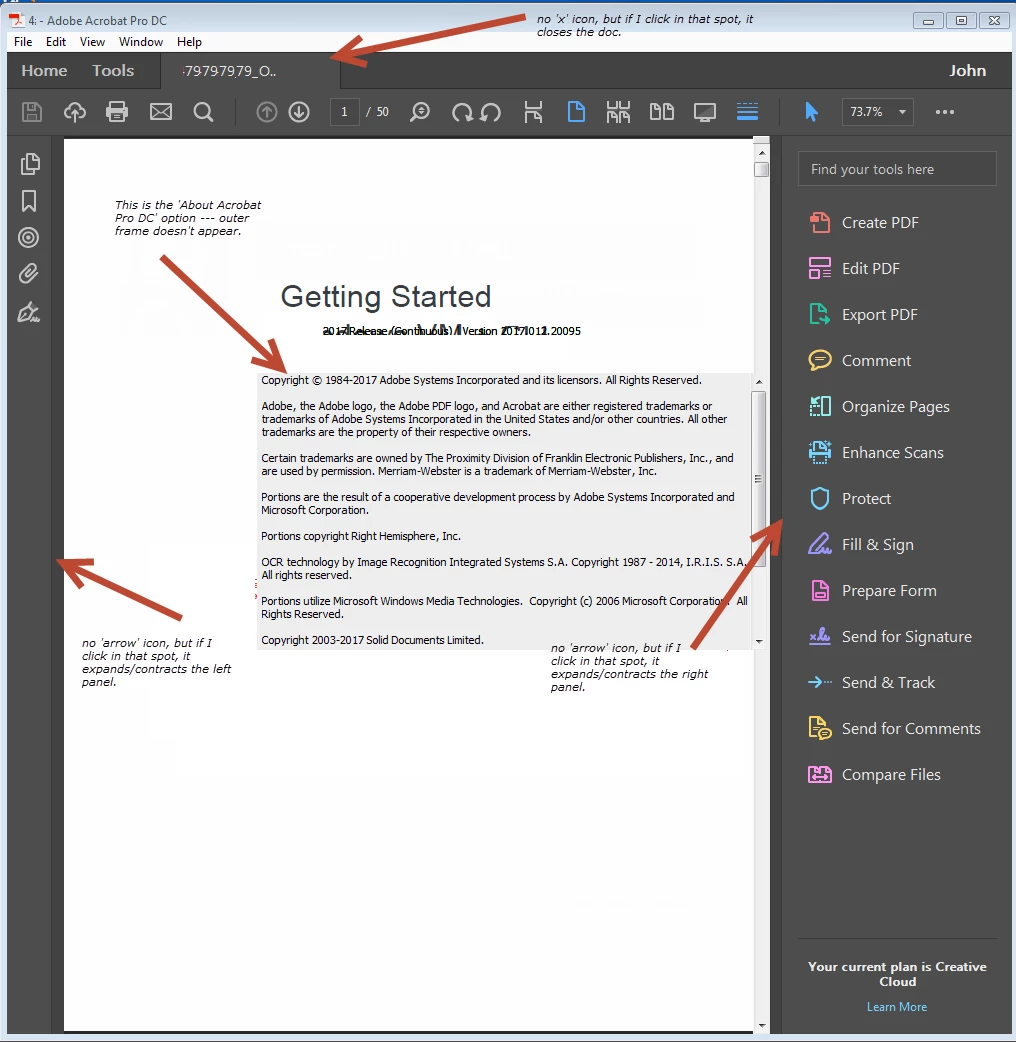
Has anybody seen this happen before and/or know how to prevent it from happening?

This topic has been closed for replies.
Correct answer jaggedpeak

well, I *thought* it started working after process below.

But... moved Acrobat from one screen to another (landscape to portrait monitors), problem reoccurred.

Argh.

----------- original response below --------------

Okay, it's working now.

I did Help > Repair Installation.

Then closed and re-opened Acrobat.

Opened doc, same problem. Went to various options/panels, no change.

Help > Repair Installation again

Closed/reopened

Opened doc, same problem. Went to right hand pane, selected Comments, and now all the UI elements jump back into place.

Weird :-)

1 reply

jaggedpeak
jaggedpeakAuthorCorrect answer
Inspiring
August 21, 2017

well, I *thought* it started working after process below.

But... moved Acrobat from one screen to another (landscape to portrait monitors), problem reoccurred.

Argh.

----------- original response below --------------

Okay, it's working now.

I did Help > Repair Installation.

Then closed and re-opened Acrobat.

Opened doc, same problem. Went to various options/panels, no change.

Help > Repair Installation again

Closed/reopened

Opened doc, same problem. Went to right hand pane, selected Comments, and now all the UI elements jump back into place.

Weird :-)