
Question
Acrobat Pro DC: "unable to copy the user specific preferences"
I am running Acrobat Pro DC on Mac OS X El Capitan (10.11.6). I have a subscription and updates are continuous.
When I attempt to run preflight, I get the following error: "unable to copy the user specific preferences" or this error (attached).
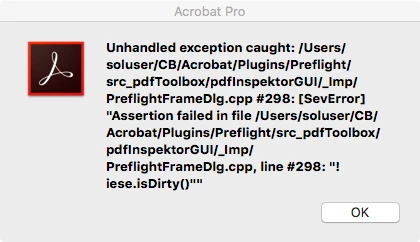
The only fix I found on this online was to delete the "Preflight Acrobat Continuous" folder, which I have done several times, to no avail. I have tried restarting - nothing.
I am downloading OS X Catalina to see if it is more compatible with this version of Acrobat Pro DC. In the meantime, any help anyone can provide would be great.
 AdChoices