Answered
Acrobat Pro Default Page Number and Date Format
Does anyone know a way to set the default page numbering to "Page 1 of n" in Adobe Acrobat XI Pro? If not, is there a shortcut?

Does anyone know a way to set the default page numbering to "Page 1 of n" in Adobe Acrobat XI Pro? If not, is there a shortcut?
Can you clarify this please? Do you want this numbering convention to be on the face of the document (as in a footer)? You can configure this in the Header & Footer dialog box, and can then save it as a customization, allowing you to use it anytime you wish.
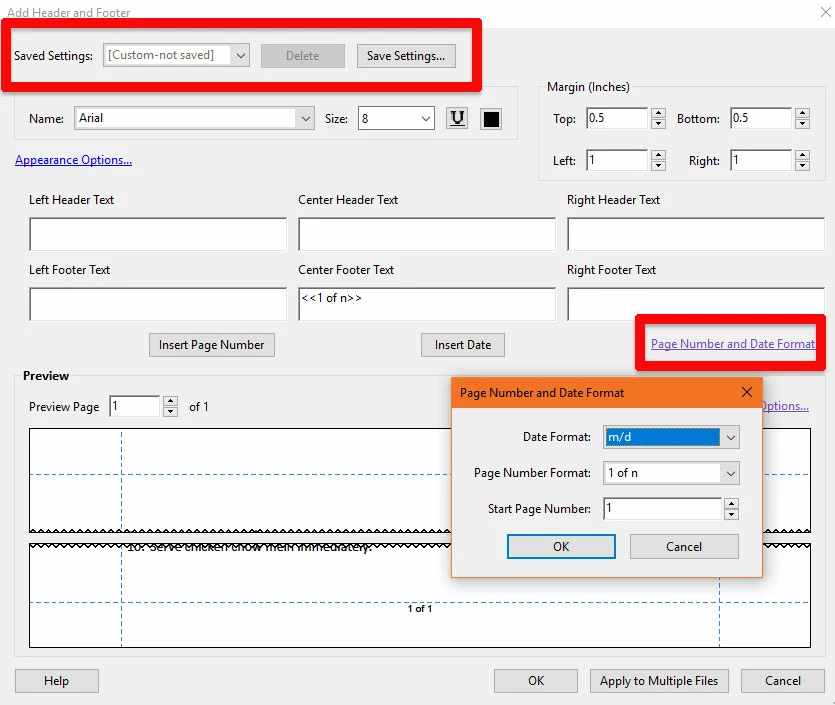
I understand that this is not set as the default (still looking for that capability), but one can also apply the custom header/footer to multiple files (button at the bottom, which will allow you to apply this setting to a whole collection of PDFs in one click.
I hope this info is useful.
My best,
Dave
Already have an account? Login
Enter your E-mail address. We'll send you an e-mail with instructions to reset your password.
 AdChoices