
snokas782721
Inspiring
August 12, 2024
Question

Acrobat Pro installation issue when Acrobat Reader is installed

  • August 12, 2024
  • 1 reply
  • 718 views

Hi,

Hope someone can help me out on this. Sorry for swedish language on screenshots.

I have two clients, one Windows 10 and one Windows 11.

I install same creative cloud installation file on both machines.

I log on with same account on both.


In W11 i can install my Acrobat Pro.
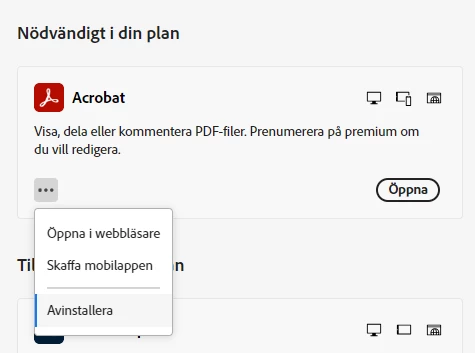
 

I can click Open ("Öppna") and have the opportunity to Uninstall (Avinstallera).

Works like excpected.


In W10 this won't work:

I didn't get the opportunity to click install. It says "installed on this client" (Installerat på den här enheten).

When i click Open (öppna), nothing happens.
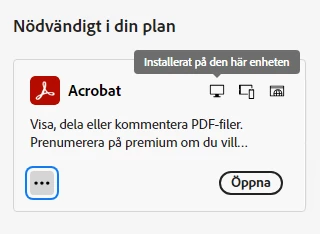
 

I don't have the opportunity to uninstall.
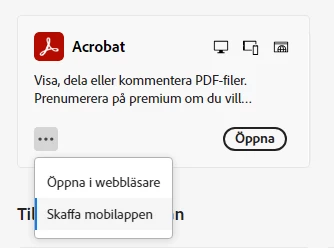
 

In "programs and features" on Windows 10, there is no Adobe Acrobat to uninstall. But in W11 there is.

I tried both Acrobat cleaner, and CC cleaner and made a reinstall on Creative Cloud, but no luck in Windows 10. I can't install or open Acrobat.


My both clients is activated under my account. I've also deactivated the W11 client.


Any idea whats wrong?

Thanks!


This topic has been closed for replies.

1 reply

snokas782721
Inspiring
August 13, 2024

This happens when you have Acrobat Reader version 24.002.20895 installed.

I will update Acrobat Reader to latest to see if this problem persists.


If i uninstall Acrobat Reader completly i will be able to install Acrobat Pro. This is a new phenomenon since our end-users always by default have the reader version installed.

snokas782721
Inspiring
August 13, 2024

This issue persits with Acrobat Reader 24.002.21005 installed. This has not been an issue before.

@adobe - is this a new system requirement that Acrobar Reader cannot be installed if you want to install Acrobat Pro?

Community Manager
September 17, 2024

Hi @snokas782721


Sorry for the troubling experience. 

It usually happens if there are traces of the previous installation of Acrobat on the machine. To remove Acrobat from the machine, use the Acrobat cleaner tool: https://www.adobe.com/devnet-docs/acrobatetk/tools/Labs/cleaner.html. Once done, re-launch the Creative Cloud app and try again. It should work. 


Also, if your operating system is 64-bit and you are trying to install Acrobat 64-bit, which is likely what is happening, then you can install either Acrobat or Reader. 


Let us know how it works at your end. 


~Tariq