Inspiring
April 11, 2025
Answered

Acrobat Pro (latest) defaults to bold face for new bookmarks. How to revert to normal behavior?

Acrobat Pro (latest) defaults to bold face for new bookmarks (this is new, two days old for me, possibly after a silent update). Is this just me or generally true? How to revert to normal behavior?


tx

justlearn
justlearnCorrect answer
Community Expert
April 19, 2025

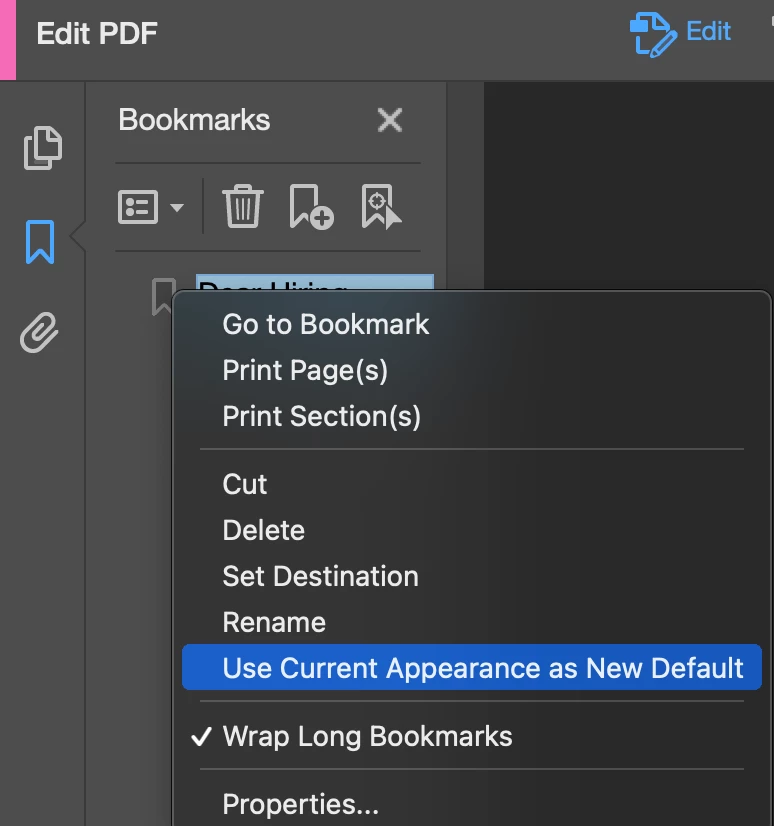
@JIPNET to add what @Tariq Ahmad suggested, another way to revert to the normal behavior, the easiest steps are to create a new bookmark with the desired non-bold formatting, then right-click on that bookmark and select "Use Current Appearance as New Default". This should instruct Acrobat to use the formatting of your selected bookmark for all subsequently created bookmarks.


m

5 replies

Legend
April 11, 2025

Hi @JIPJIPNET, 


Thanks for reaching out and always thanks for sharing your feedback and observations. 


Could you please share a couple of screenshots and check if the behavior is the same in classic Acrobat? To disable Modern Acrobat(assuming you have a Mac). Acrobat > View > Disable Modern Acrobat.


Will be waiting for your response.


~Tariq

Translate
JIPNETAuthor
Inspiring
April 11, 2025

Modern View:

Classic UI:


Translate