


kuno1501
Participant
June 22, 2026
Answered

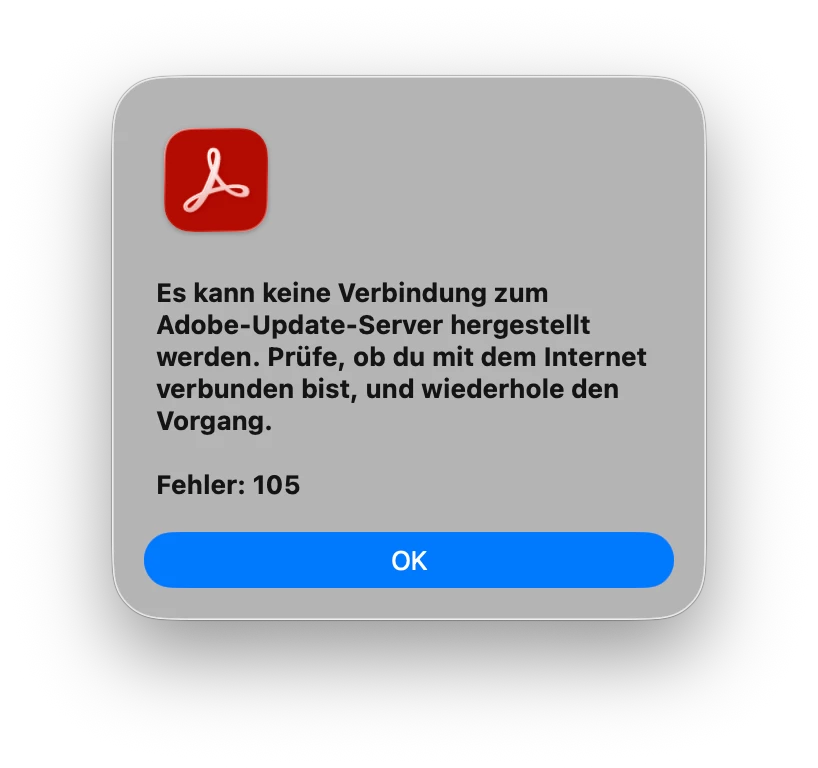
Acrobat Pro macOS: Es kann keine Verbindung zum Adobe-Update-Server hergestellt werden. Fehler 105. Vorgeschlagene Reparaturversuche brachten keinen Erfolg. 
  • June 22, 2026
  • 3 replies
  • 98 views


    Correct answer kuno1501

    @Meenakshi0101 

    Hi, I found and resolved the problem. An OpenVPN Connect client was installed, which was apparently interfering with communication with the update server. The issue was resolved after uninstalling this client.

    3 replies

    Community Manager
    June 23, 2026

    Hi ​@paulo_8095


    Thank you for reaching out and for sharing the screenshot.

    We are sorry to hear you are experiencing this. The error indicates that Acrobat is unable to reach Adobe's update servers. Please first check Adobe service status at status.adobe.com to confirm whether there is an active incident in your region.

    You can update Acrobat manually in the meantime by downloading the latest patch directly from the Acrobat release notes page:

    www.adobe.com/devnet-docs/acrobatetk/tools/ReleaseNotesDC/index.html 

    Download the appropriate patch for your version and install it directly.

    Could you also confirm whether this is a personally owned machine or a work managed device? This will help us advise further.

    If you are on a restricted or corporate network, your firewall may be blocking Acrobat from reaching Adobe's update servers. Please share the following network endpoints documentation with your IT team to ensure the required domains are allowlisted:

    https://helpx.adobe.com/enterprise/kb/network-endpoints.html   

    Adobe requires URLs and domains to be accessible on port 443 for Acrobat updates and services to function correctly.

    Please let us know how it goes and we will be happy to assist further.


    ~Tariq

    kuno1501
    kuno1501Author
    Participant
    June 23, 2026

    Hi,

    I also tried with the firewall disabled, but unfortunately without success. There are no blocks for Acrobat, either. It is a personal computer running macOS 26.5.1. The error also occurs in another network.
    The error does not occur on another computer running Windows 11.

    Meenakshi0101
    Community Manager
    Community Manager
    June 23, 2026

    Hi kuno1501,


    Thank you for the information. I'm sorry to hear that the suggestion didn’t work. Since you are using the application on a personal machine, please try the following steps to verify that Adobe services are reachable:

    • Open a web browser and confirm that Adobe websites load normally. 
    • If you are using a VPN, security software, web filter, or corporate network, temporarily disable or bypass it and test the update again. Error 105 is commonly associated with connection failures between Acrobat and Adobe's update servers.

    You might also want to reset the Acrobat preferences:

    • Quit Acrobat.
    • Rename the Acrobat preferences folder in: ~/Library/Preferences/
    • Launch Acrobat again and test for updates.


    If the issue persists, please try reinstalling the application by following these steps:

    • Remove the application and run the cleaner tool (https://www.adobe.com/devnet-docs/acrobatetk/tools/Labs/cleaner.html).
    • Reboot the machine 
    • Install Adobe Acrobat from the following page: https://helpx.adobe.com/acrobat/kb/acrobat-dc-downloads.html. 

    Check if this resolves the issue.


    If the problem continues, please let us know.


    Thanks,

    Meenakshi

    Known Participant
    June 22, 2026

    Outra não sou obrigado a saber outras linguas estou no Brasil tratem de aprender o portugues.Se to pagando duas assinaturas tem que vir tudo em portugues e não em linguas alienigênas.

    Known Participant
    June 22, 2026

    Que saco cada hora o Adobe nos aprontam uma hora é isto, outra hora é aquilo assim do nada pago duas assinaturas para não ter porcaria hoje tenho que certificara assinatura com meu token e a Adobe ocultou meu token qual é de voces da Adobe
