Inspiring
July 31, 2025
Answered

Acrobat Pro no longer supports batch .msg files to individual PDFs

  • July 31, 2025
  • 1 reply
  • 1633 views

As early as January of this year I was able to select hundreds of .msg files from Outlook and convert to individual PDF files using the Acrobat tool from Outlook. This was a quick seamless process and valuable tool. What has changed and is there another solution?

Correct answer cathy_0927

Thanks for the quick response, @cathy_0927

Now, enable the option, and click Ok. And then try converting emails again. 

Take a screenshot of the converted document without revealing confidential information, especially on the left side portion of the file. 


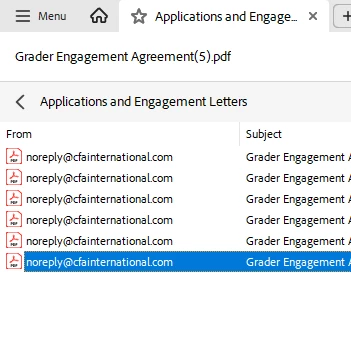
You should be able to see the results like this. Double-click on the second item on the list "ahm.....(1)", of course, this will be different for you. Then the inbox will come up, and double-click on that, and you should be able to see all of your emails. Let me know how it works


Best regards,
Tariq | Adobe Community Team


That seems to have worked! Perhaps I wasn't drilling into that folder previously or something was reset when removal of this function and re-enabling again. I will try with a larger batch of 450+ .msg files now. Thanks very much!

 

1 reply

Community Manager
July 31, 2025

Hi @cathy_0927


Thanks for reaching out. 
Here are a couple of things we need to check: 
1. Ensure Acrobat is installed on the machine. 

2. Acrobat PDF Maker plugin is enabled in Outlook. For more information on PDFMaker on Windows machine: https://adobe.ly/4oechAb;


Please provide more details if the above suggestions don't help. And it would be helpful if you could provide the following details:

  1. Acrobat version installed:  https://adobe.ly/3PQQ7nE
  2. OS name and version.
  3. Screen recording showing the problem. 


Best regards,
Tariq | Adobe Community Team

Inspiring
July 31, 2025

Hi Tariq. Thanks for your response. I have Acrobat PDF Maker enabled in Outlook, with version in this clip.


Inspiring
July 31, 2025

For security purposes I can not record the issue, but will rather relay in writing. In Outlook I shift select 400+ .msg files from an Outlook folder. I click on Acrobat plugin tool, Selected Messages, Create New PDF, select Save location, progression pop-up appears to work with counts of files created/files remaining, then file opens but only includes the first .msg file converted to PDF, not the remaining 400+ files.

