
Participant
December 30, 2023
Answered

ACROBAT PRO PAGES OPEN WRONG SIZE IN FULL SCREEN

  • December 30, 2023
  • 2 replies
  • 1619 views

I've tried to explain the problem as clearly as possible. So, with all due respect, I ask you to please read all of this before responding.


I run Mac os Sonoma 14.0 and

Acrobat Pro /version 2023.006.20380

Problem: I have tried every setting and combination of settings to get my pdf to open in full screen correctly and open linked pages correctly. The screen is in full screen but the actual page appears too big or too small. Nothing seems to work. Under "View" settings: Actual size, no. Zoom to fit, no. Fit to height, no. In "Properties" settings: Default, no. Actual size, no. Fit page, no. Plus various combinations of all of the above.


I'm embarrased to say how much time I've spent on this. Not hours, days. I called support and the guy clicked around settings and eventually said it would only work if viewed in a browser.


I need to have a pdf that looks professional because I am selling it. No compromise.


Correct answer philip hanft

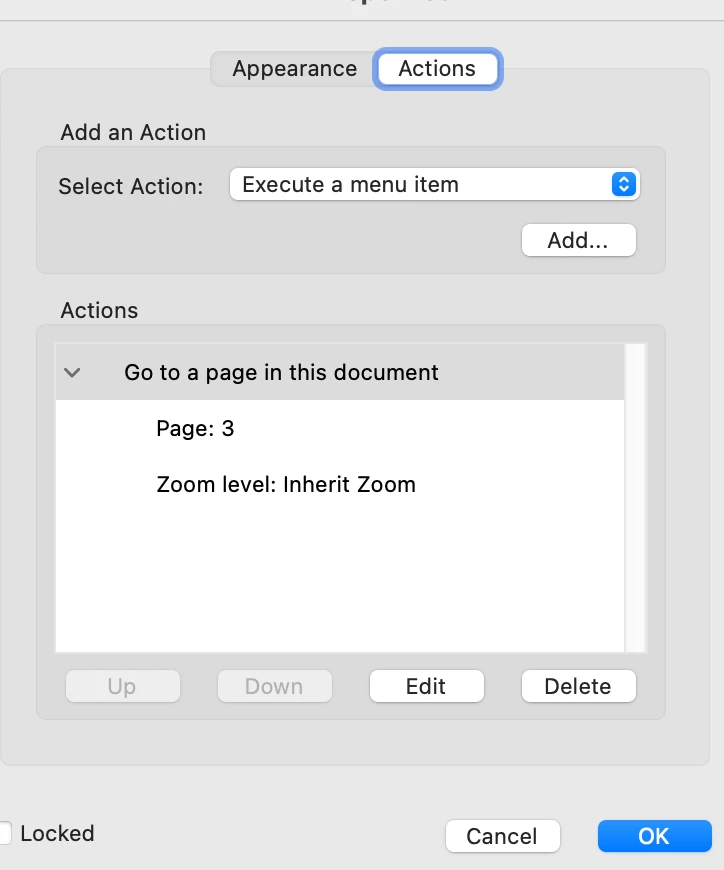
I figured this out. It is a very sneaky solution. Double click a link with the link tool. It'll open a dialog box where you want to click on Actions. Do that and then click on Edit. SetIn the edit dialogue box in the and set the zoom level to Inherit Zoom. Boy they sure did a great job of hiding this feature. I bet I'm the only one who knows about it. See below.


2 replies

philip hanftAuthorCorrect answer
Participant
January 3, 2024

I figured this out. It is a very sneaky solution. Double click a link with the link tool. It'll open a dialog box where you want to click on Actions. Do that and then click on Edit. SetIn the edit dialogue box in the and set the zoom level to Inherit Zoom. Boy they sure did a great job of hiding this feature. I bet I'm the only one who knows about it. See below.


Amal.
Community Manager
Community Manager
January 1, 2024

Hi @philip hanft 


Hope you are doing well and thanks for reaching out.


Please try to update the application to the new version 23.08.2042X from the help menu > check for updates and reboot the computer once.


Also, go to Preferences (Ctrl,Cmd+K) > Full Screen > Select, 'Fill Screen with one page at a time' > Click OK and reboot the application and check.


Let us know if you are referring to something else.


~Amal