
Klаus
Inspiring
September 7, 2024
Answered

Acrobat Pro, Windows 10: Can’t start Preflight tool

  • September 7, 2024
  • 1 reply
  • 2778 views

[Version 2024.003.20054 | 64-Bit]

When klicking on Preflight, a window pops up saying something like
»Preflight is about to be installed. Please wait for completion, in order to use the tool«

but nothing like that seems to happen.

Can’t use preflight. Why is that???
This topic has been closed for replies.
Correct answer S_S

That did not help either. This is kind of frustrating.

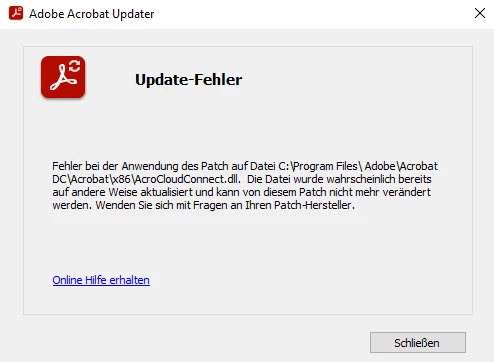
Checking for available updates, I was informed that there’s a new version. So I started the update, which – why, sure: failed. Ridiculous ...


@Klаus Thanks for the response.


Please run the Acrobat cleaner tool https://www.adobe.com/devnet-docs/acrobatetk/tools/Labs/cleaner.html, reboot the computer once, and install the application using the direct link https://helpx.adobe.com/acrobat/kb/acrobat-dc-downloads.html and see if that works for you.


-Souvik

1 reply

S_S
Community Manager
Community Manager
September 9, 2024

Hi @Klаus,


Hope you are doing well. Thanks for writing in!


Apart from the basic features of Acrobat, every additional tool will require a one-time download, so you can use it from the next time onwards. This is to save you storage on your device if you do not require the tools.

Once all the tools are ready for use, you should see a small toast notification to the top-right of Acrobat notifying you of the successful completion of the tools.

The completion time depends on the band of your internet connection.


Once done, the plugins folder of Acrobat should look like this (screenshot attached below), with all the tools successfully installed.


Hope this clarifies your question.


-Souvik

Klаus
KlаusAuthor
Inspiring
September 16, 2024

Thanks for your input, Souvik!


I have two plug_ins folders on my computer:

C:\Program Files\Adobe\Acrobat DC\Acrobat\plug_ins
D:\Program Files\ADOBE\Adobe Acrobat 2020\Acrobat\plug_ins

The first one contains a PreFlight.DEU, the second one a PreFlight.DEU and a Preflight.api


Well, the problem persists ...

Inspiring
September 23, 2024

Indeed, I have the same problem.  Clicking Preflight states that it needs to be downloaded then minutes later it fails with an error about not being able to install it and from then on, the left hand menu pane is devoid of all tools and needs a reboot to fix. Grrrrrrr.....

I suspect it's something to do with admin rights (which I don't have) and that the Acrobat installation doesn't handle failure properly, so just goes into some indeterminate state and stops the software working properly.

In 2024, why is is so difficult to just add Preflight to the Creative Cloud apps and be done with it?!?  If I have the rights to install any CC app, why does Acrobat block a plugin?