Participant
March 26, 2013
Answered

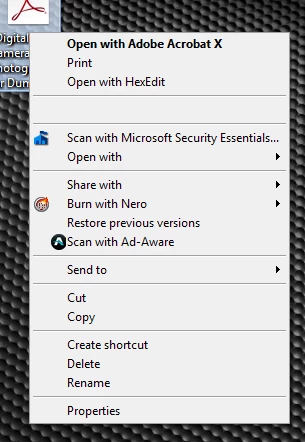
Acrobat Pro X combine context menu is present, it's just blank.

  • March 26, 2013
  • 17 replies
  • 54193 views

The right-click context menu to combine files was available two days ago at the latest.  When I tried to use it today, the placeholder is there, but there is no text.  The entry still functions as intended, it's just annoying.  See the pic.

Any thoughts? <edit> I've done an uninstall/reinstall, manually registered the .dll, and done inverted jumping jacks, all to no avail.

This topic has been closed for replies.
Correct answer

Hi,

I have/had this issue too, so I thought I'd share my experience with it.

In my case, it seemed to be related to the Google Drive client for Windows. The issue showed up after I installed it and would go away if I uninstalled it. However, with Google Drive installed, the issue wasn't always present.

So I've still got Google Drive installed and seemed to have rid myself of the problem. Well, it's been fine for a about a week so far since I took the following steps below.

  • I used CCleaner to view the context menu dlls (In CCleaner, go to Tools>Startup>Context Menu).
  • I disabled the two Google Drive context menu items and my Acrobat items were back as normal (for me at least, no reboot was necessary to see the change).
  • If you don't have Google Drive installed, try disabling other entries to see if it helps identify another possible conflict.
  • After re-enabling the Google Drive items, my context menu is now back to normal with all entries displaying and functioning correctly (even after multiple reboots).
  • NOTE: I may have disabled and re-enabled the Acrobat items as well but I'm not sure. I just mention this in case it did have something to do with alleviating the problem.

As I said, it's only been about a week since I did this so I don't know if the issue will return, or if it will work for everyone.

17 replies

Participant
April 1, 2013

Just curious - is everyone using the latest Acrobat update released on Feb 20?

Participating Frequently
April 1, 2013

I'm using the latest; Acrobat X version 10.1.6

Participant
April 1, 2013

I have the same problem and yes the version is 10.1.6

please make this your first priority to fix, this is very annoying.

Participant
April 1, 2013

Same here too. I no longer have the options to create a PDF or Combine files. I'm using Acrobat 9.0 pro and Windows 7 on a 64 bit machine. Tried everything. repair, reinstall, deleted latest Acrobat reader in case there was a conflict. I tried the regsvr32 contextmenu64.dll tip. Here's the thread: http://forums.adobe.com/thread/785569.

A message box popped up and said it worked, but nothing happened.

Adobe - please make this a priority to fix or offer a workaround. It's impacting my productivity.

Participating Frequently
April 1, 2013

Same problem here. Windows 7, Acrobat X. I've also tried the ContextMenu64.dll fix to no avail.

Participating Frequently
March 29, 2013

Exact same problem since a few days and exact same failed fix (ContextMenu64.dll).

Can someone from Adobe give us a fix that works? They must be aware of that happenning!

Specs : Windows 7 Home premium x64, Acrobat X 10.1.6

In my case I had just installed Internet Explorer 10 that completely screwed my Aero theme removing all transparencies. Uninstalling IE 10 brought back Aero. As for Acrobat X I can't be certain that it happened with that IE upgrade but I suspect it could.


March 29, 2013

FYI The Share link is Windows 7 File Sharing context menu.

Participating Frequently
March 29, 2013

To Sabian Zildjian :

Yes, that "Share" link is the Windows file Sharing button, but when I use it now on a jpeg image for example, it opens it converted to PDF ready to be saved...

Somehow there's a mix up with those Acrobat functions (convert to PDF, Combine etc...)

Participant
March 28, 2013

I can rule out IE10, as I don't have it installed. As for Windows updates, I can safely say it's doubtful, as I have WU setup for approval of update installation and did not install any updates between a working and non-working state.  Strange thing is, I didn't have any Adobe updates push through either (that I am aware of, it's set to only notify of any updates).  Also, @M_Mauro, I never really noticed the "Share ..." selection, but when I right-click on any image, it gives me the same listing that yours does.

Participating Frequently
March 28, 2013

Hey James.. yep, I (we) get the share item when clicking on an image but when clicking a PDF I get just one blank item (as depicted in your original post).

Funny because now that I think about windows update being the cause - I have my automatic installs disabled as well. Also IE10 isnt installed on this machine either..

March 28, 2013

Try running Repair from the Help menu.

Participating Frequently
March 28, 2013

EXACT same issue here.. glad I'm finally not alone as I've been frantically restoring backup after backup trying to figure out wtf has caused this to happen. I used these context features daily so I noticed immediately when they were replaced with a blank slate along with an odd "Share" title and checkmark that bears no relevance to anything.

This happened first a few days ago and after restoring to a recent backup I was able to get the context menu back (registering ContextMenu64.dll had no effect - as per solutions to similar problems). But now tonight it has once again disappeared and has been replaced with the bank and "share" menu items.

I have a feeling a possible windows update is causing this?...

http://i.imgur.com/7ckCVgo.png

Participating Frequently
March 28, 2013

I'm guessing Windows Update as well.

Or IE10?

Participant
March 27, 2013

Probably should have included in the original post:  Win7-64-bit, no additional updates or new software between working/non-working state.

Participating Frequently
March 26, 2013

Having same exact issue with Acrobat 9.5.4 (windows 7 - 64-bit).  No idea what did this...