
Acrobat Pro X - how to change font formatting in multiple annotation (text) boxes at one time
Hi,
I work with many PDFs at my job and each one can be hundreds of pages long, and I primarilly use Adobe Acrobat Pro X (employer provided software, and I am limited to this version that my employer provides). In these PDFs, myself and my coworkers use the annotation text box tools to convey directions and instructions to other end users. Over the course of time, many different people have and will work with these PDFs, and these PDFs have worked across different versions of Acrobat Pro over the past 15 years or so.
These PDFs may have dozens of annotations on every page, and each document maybe 50 to 300 pages long. Unfortunately, many times the annotations were created by various different users using different fonts and colors for the text in those annotations.
Is there any way to change the color and other text attributes (alignment, font, face, etc), of ALL of the annotation text boxes AT ONE TIME?
So far, I have not found any information during my Google searches for this topic.
I found some online resources that allude to using Java, or JS, (some type of scripting language), to do this, but they do not offer the specific script that is needed for it.
If I have to use a Java or other script to do this, that is fine, I know how to load a script and how to make it run. Unfortunately, I am not a Java programmer, and I haven't programmed anything on a PC since 15 years ago, so I essentially have no idea how to program in Java or other modern programming languages.
Please send me any help that you can, or any Scripts that can do this. Thank-you.
Unfortunately, I have to work within the confines of Adobe Acrobat Pro X, because this is the version of the software that my company is currently provides to us.
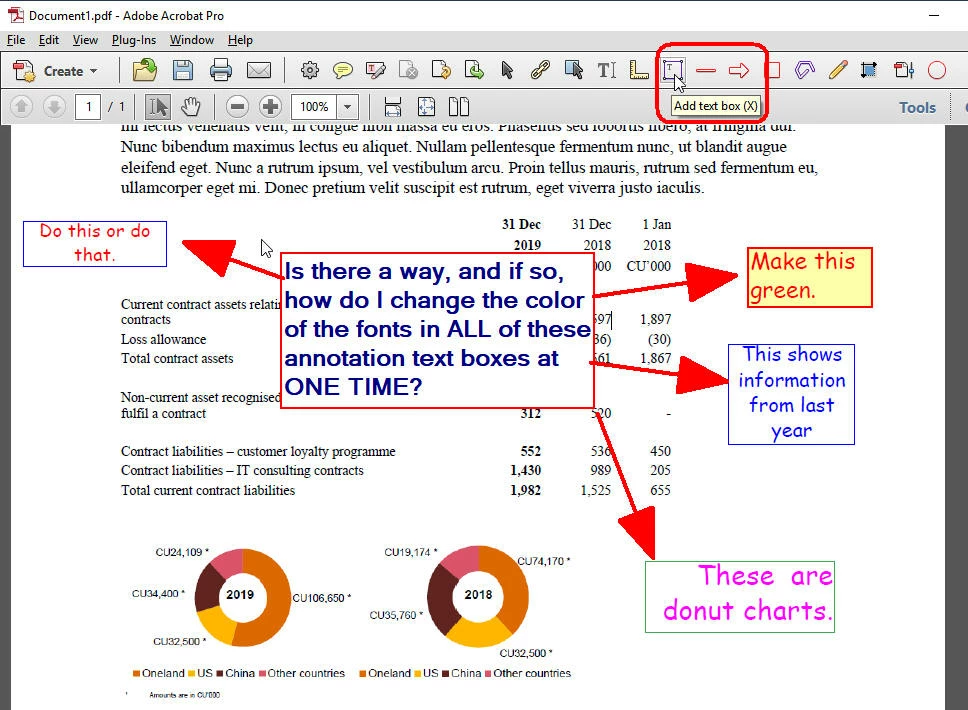
See attached screen capture of a sample PDF page: At some point, various different operators used the "Add text box (X)" tool to add annotation text boxes. Unfortunately, the various different users all used different settings for their boxes and for the content (text) within those boxes. I need to be able to edit the format of the TEXT within those boxes, but I need to be able to edit ALL of the content in all of the boxes simultaneously (either by selection, by page, and/or by document). So far, I can not find a way to do so.
In any given file, we can have thousands of these annotation text boxes, making it logistically impossible for me to go back and edit each one individually. I really need a solution where I can edit the formatting of this text, in all of the annotation boxes, at one time.
Thank-you for any assistance that you are able to provide,
An everyday user of Adobe Acrobat Pro,
Mark F.
 AdChoices