Answered
Acrobat Professional keeps "unstalling" and diverting to Acrobat Reader
I (and a number of my co-workers) are having issues with Acribat Professional "unstalling" itself. It appears in Creative Cloud that it is installed and up to date, but clicking on open does not work and when I click on my desktop shortcut, it gives me this error message:
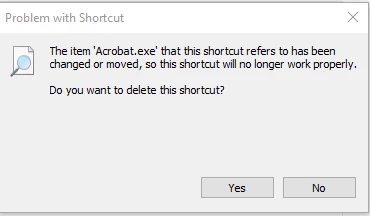
I can uninstall the app and reintsall, and it works temporarily but then less than a couple hours later, the issue reoccurs. This is not happening to any of my other apps and we have an updated subscription to Creatve Cloud. Is anyone else experiencing this and is there a solution other than reinstalling it repeatedly?
 AdChoices