
Participant
September 15, 2020
Question

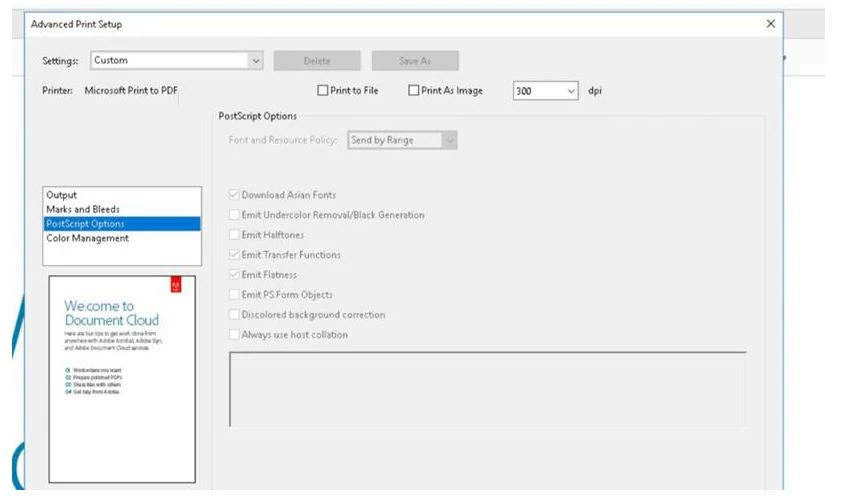
Acrobat Reader Pro DC - Postscript options greyed out

  • September 15, 2020
  • 2 replies
  • 4486 views

HI All 


Hope someone can help with the following. 


Within Advanced print setup > custom > Postscript options all the tick boxes are greyed out and i am unable to tick / untick. 

I have checked and no group polices are applying these settings or blocking them.

The version is 2020.012.20043 licensed. 


Thank you


This topic has been closed for replies.

2 replies

Dov Isaacs
Legend
September 15, 2020

There are a few possibilities here, none of which have to do with group policies (no group policy is applicable to these options):


(1)    These printers have non-PostScript drivers installed or selected. Both Xerox and Hewlett-Packard support both PostScript (in the case of Hewlett-Packard, an “emulation” of PostScript) and PCL. If the PCL drivers are installed or selected, you won't see the PostScript option.


(2)    The only proper PostScript drivers to use with Adobe applications (including Acrobat, Illustrator, Photoshop, InDesign, and FrameMaker) are Version 3 (V3) PostScript drivers based on the PSCRIPT5.DLL printer driver. These are the only drivers that identify themselves to applications as PostScript drivers. Regrettably, for a few years, Microsoft tried to convince printer manufacturers to only distribute Version 4 (V4) drivers based on XPS which besides not generating particularly good PostScript, also don't support notification to the applications which generated their own PostScript (such the Adobe applications do). If you are using a V4 driver, replace with a V3 driver.


- Dov Isaacs, former Adobe Principal Scientist (April 30, 1990 - May 30, 2021)
Sean5CBBAuthor
Participant
September 24, 2020

Hi Dov


Thank you for the reponse. i have checked with our print room team and driverV3 is the current driver in use. (info below) The unusual thing is the the free version of adobe reader can access the postscript settings but not the full licensed version of acrobat. im not too sure what to try next now. 


Many thanks


V3 Xerox Global Print Driver PostScript

Description

This version of the V3 Xerox Global Print Driver uses the Windows Add Printer wizard. For complete instructions, please refer to the installation guide.↵

  • Released: 06/16/2020
  • Version: 5.733.11.0
  • Size: 37.03 MB
  • Filename: UNIV_5.733.11.0_PS_x64.zip
  • Tags: GPD/MED, Package-Aware, PostScript, V3 Driver, WHQL
Legend
September 15, 2020

You need to select a PostScript printer.

Sean5CBBAuthor
Participant
September 15, 2020

Thanks but we selected multiple printers, we have a slection of xerox and HP printers we can choose from, all the same greyed out settings. 


Also to note is with a standrd free version of adobe actobat we can change the settings no problem.

Legend
September 15, 2020

Choose one which is definitely a PostScript driver and redo the screen shot, please. Or are you guessing that among these drivers surely one of them is? What do you want to achieve with these options?