

Acrobat's UI Not Visible on Mac Launch
Problem: The Acrobat user interface is not visible when launching the application on a Mac
If you are on a Mac and trying to open a document in Acrobat, you might come across a situation where you can see the Acrobat icon in the dock, but the actual user interface needs to show up. One likely reason for this issue is if you have multiple monitors connected.
Here are a couple of workarounds you can try to resolve the issue:
Workaround 1: Select Zoom from Acrobat's Window menu.
- Open a PDF in Acrobat. You should see Acrobat's icon in the dock.

- Look at the top of the screen for Acrobat's menus like File, View, Edit, Window, and Help.

- Click on the Window menu and select Zoom.
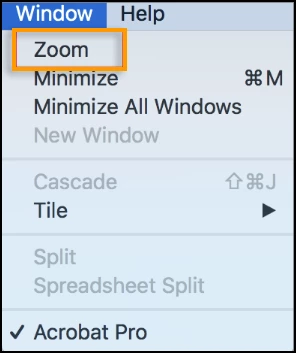
It should bring the Acrobat user interface to the foreground, making it visible.
Workaround 2: Remove external monitors.
- Disconnect all external monitors connected to your Mac.
- Relaunch Acrobat and check if the user interface appears correctly.
Give these workarounds a try and see if they help resolve the issue.
Have you found this answer helpful? If so, Join the conversation with us and share your thoughts. Your feedback is valuable to us, and we are always listening.
 AdChoices