Participant
January 17, 2020
Answered

Acrobat shutting down when I view file properties

  • January 17, 2020
  • 1 reply
  • 1657 views

This is a new problem for me. Every time I go to view file properties, no matter what the PDF is, Acrobat shuts down. I need to be able to view the page size and set view settings using the file properties tab.

Any solutions? I've already uninstalled and reinstalled Acrobat. No change. Most of the PDFs are created with InDesign. This is a problem that started about three days ago for me.
This topic has been closed for replies.
Correct answer StephanieAndersonAlt19

I'm using Acrobat Pro DC Version 2019.021.20058


I've uninstalled and reinstalled twice. This is a new problem (been doing the same thing for years). 


To view, I go to File->Properties. That's when it shuts down no matter what file I'm viewing. Even the Welcome PDF that came up after resinstalling shuts down. 


I often make changes in the file properties (viewing options) so I need this to work but I'm at a loss for what to try next since uninstalling and reinstalling didn't work.

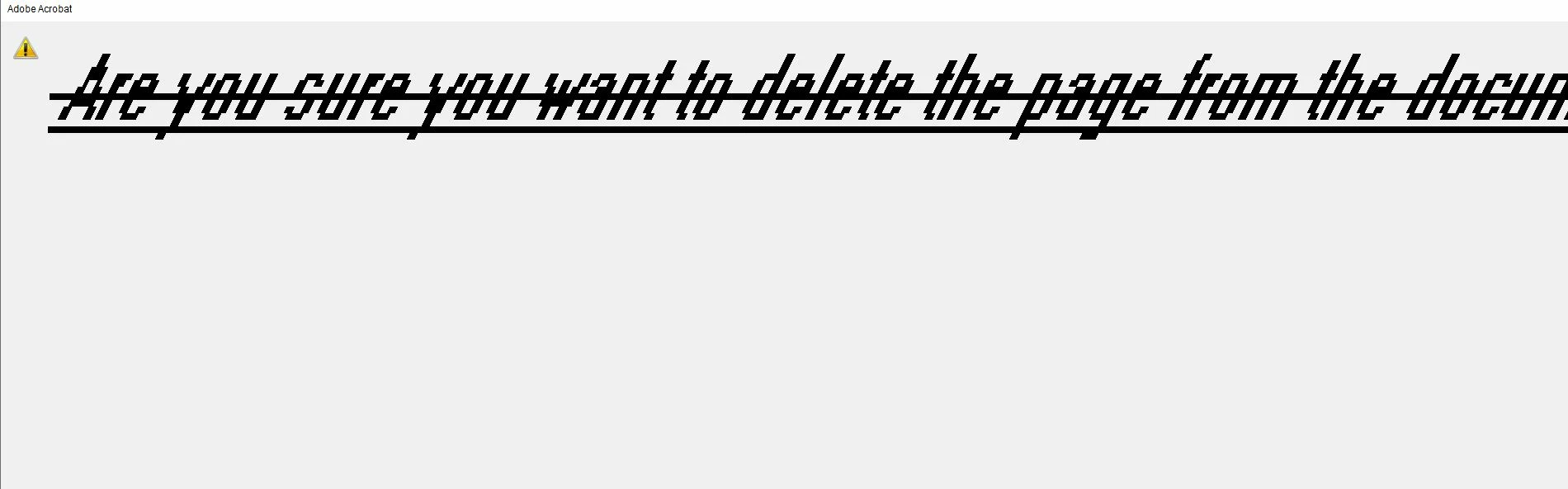
Also, when I make changes (such as deleting a page from a PDF) and go to save it, this is what I get:


Is it maybe a system font that's gone corrupt causing the issue? 

1 reply

Amal.
Legend
January 17, 2020

Hi there


We are sorry for the trouble. As described, the application crashes when you view the file properties.


Do you have Adobe Acrobat DC (Paid subscription) or Adobe Acrobat Reader DC (Freeware) and what is the version installed? To check the version of the application installed please use the help article https://helpx.adobe.com/acrobat/kb/identify-product-version.html
Make sure you have the latest version installed. Go to Help > Check for Updates.

Also, what is the workflow or steps you do to check the file properties?  Please share the screen recording of the issue you are experiencing for a better understanding.


Regards

Amal


StephanieAndersonAlt19AuthorCorrect answer
Participant
January 27, 2020

I'm using Acrobat Pro DC Version 2019.021.20058


I've uninstalled and reinstalled twice. This is a new problem (been doing the same thing for years). 


To view, I go to File->Properties. That's when it shuts down no matter what file I'm viewing. Even the Welcome PDF that came up after resinstalling shuts down. 


I often make changes in the file properties (viewing options) so I need this to work but I'm at a loss for what to try next since uninstalling and reinstalling didn't work.

Also, when I make changes (such as deleting a page from a PDF) and go to save it, this is what I get:


Is it maybe a system font that's gone corrupt causing the issue? 

Participant
January 27, 2020

Reinstalling the segoe system fonts resolved the issue.