


December 11, 2025
Question

Acrobat trying to uninstall itself?

  • December 11, 2025
  • 1 reply
  • 155 views

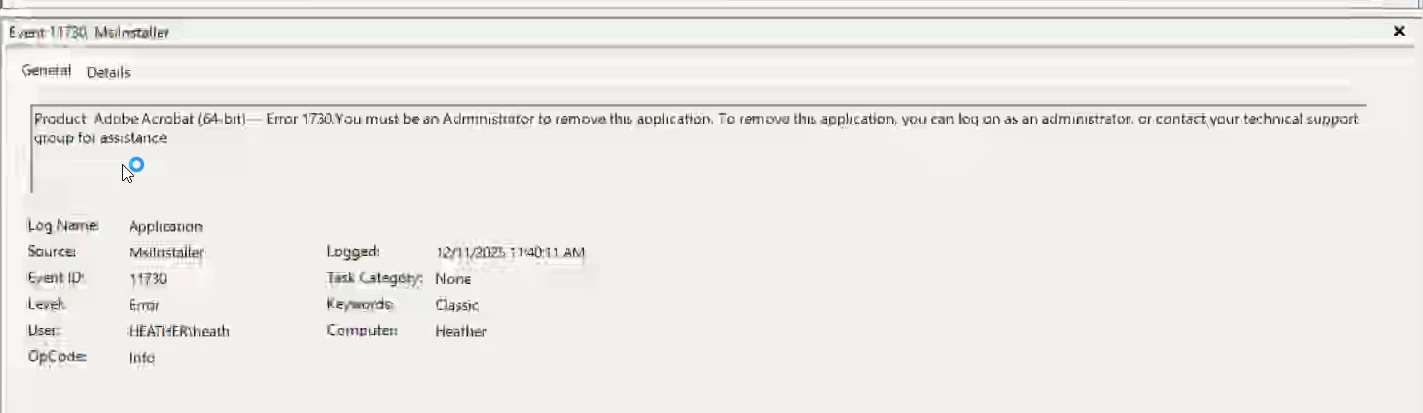
I was looking in the event log after Acrobat crashed and found this. Adobe trying to uninstall itself but it doesnt have the correct permissions.


I have not initiated any uninstall commands. I saw this a couple times in the same day.


I checked for updates, repair installed.


Why is adobe doing this? What is kicking this off?


Forgive the quality of the screenshot, it was taken from a remote session.
1 reply

Amal.
Legend
December 11, 2025

Hi there


Hope you are doing well and sorry for the trouble.


It’s unusual to see Acrobat attempting an uninstall on its own. Adobe Acrobat/Creative Cloud typically won’t remove itself unless an external factor triggers it. A few things can cause this type of behavior:

1. A failed or incomplete update
Acrobat updates sometimes run using the same installer/uninstaller service. If an update fails or the installer gets corrupted, Windows may log it as an “uninstall attempt.” A repair or reinstall usually fixes this, but if the installer cache is damaged, it can re-trigger.

2. Third-party management tools
If your system is managed by tools like SCCM, Intune, PDQ, or other software deployment systems, they may push updates or cleanup tasks. If their package is misconfigured, this can show up as Acrobat trying to uninstall itself.

3. Background Adobe Update Service
The Adobe Acrobat Update Service (armsvc.exe) can try to clean or replace files when updating. If permissions are missing or corrupted, Event Viewer may report this as an “uninstall” event.

4. Damaged install registry entries
If Windows Installer detects incomplete install/uninstall entries, it may attempt to “repair” them in the background, which again shows up as uninstall events.

What you can do next:

1. Check Adobe Update Service
Make sure Adobe Update Service and Adobe Acrobat Update Service are running normally (Services.msc).


2. Verify no deployment tools are pushing jobs
If you're in a managed environment, ask IT if any Acrobat update/uninstall packages were recently deployed.


3. Clear and reinstall cleanly
Use the official Adobe Acrobat Cleaner Tool https://adobe.ly/44jEttk  to remove old installer remnants, reboot the computer once and then reinstall Acrobat using the direct link https://adobe.ly/4rNC5Fj  . This fixes most silent background installer loops.


4. Check Task Scheduler
Look under Task Scheduler Library > Adobe to confirm nothing unexpected is scheduled.


Let us know how it goes.


~Amal