



Acrobat Update Fails on mac While Installing 25.001.2047x Optional Update
Hi Team,
In our environment, we encountered an issue while updating Adobe Acrobat DC to version 25.001.2047x (Optional Update, Apr 28, 2025). The update fails on certain macOS machines.
We analyzed a few sample machines and observed the following (note: this may not cover all possible base versions)
Successful Updates (Sample):
25.001.20438
24.004.20272
Failed Updates (Sample):
24.005.20400
24.005.20320
We primarily used the Terminal for the installation. On machines where the update failed, we also attempted installation via the standalone installer, but that too was unsuccessful.
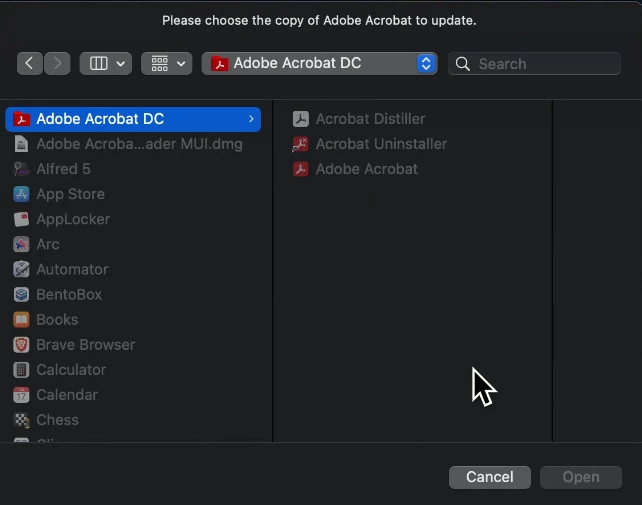
While using the installer, it prompted us to select the Adobe Acrobat application. However, even though the app was visible in Finder, it was not selectable, which resulted in the installation failing.
Additionally, we attempted the troubleshooting steps suggested for error code 105 , but the issue still persists. We’ve attached some sample logs and screenshots for your reference.
Looking forward to your quick assistance.
Log Traces :
2025-05-12 12:01:34+05:30 test_mac package_script_service[7534]: ./preinstall: 2025-05-12 12:01:34.778 AcroPatchInstall[7566:4208683] AcroPatchInstall:ERROR: Could not find a valid application to patch. Installation failure.
2025-05-12 12:01:34+05:30 test_mac package_script_service[7534]: ./preinstall: ERROR: Preinstall exited with error code 105.
2025-05-12 12:01:34+05:30 test_mac package_script_service[7534]: PackageKit: Hosted team responsible for script has been cleared.
2025-05-12 12:01:34+05:30 test_mac package_script_service[7534]: Responsibility set back to self.
2025-05-12 12:01:34+05:30 test_mac install_monitor[7533]: Re-included: /Applications, /Library, /System, /bin, /private, /sbin, /usr
2025-05-12 12:01:35+05:30 test_mac installd[6984]: PackageKit: releasing backupd
2025-05-12 12:01:35+05:30 test_mac installd[6984]: PackageKit: allow user idle system sleep
2025-05-12 12:01:35+05:30 test_mac installd[6984]: PackageKit: Install Failed: Error Domain=PKInstallErrorDomain Code=112 "An error occurred while running scripts from the package “AcrobatDCUpd2500120476.pkg”." UserInfo={NSFilePath=./preinstall, NSURL=file://localhost/Volumes/AcrobatDCUpd2500120476/AcrobatDCUpd2500120476.pkg#payload.pkg, PKInstallPackageIdentifier=com.adobe.acrobat.AcrobatDCUpd2500120476, NSLocalizedDescription=An error occurred while running scripts from the package “AcrobatDCUpd2500120476.pkg”.} {
NSFilePath = "./preinstall";
NSLocalizedDescription = "An error occurred while running scripts from the package \U201cAcrobatDCUpd2500120476.pkg\U201d.";
NSURL = "file://localhost/Volumes/AcrobatDCUpd2500120476/AcrobatDCUpd2500120476.pkg#payload.pkg";
PKInstallPackageIdentifier = "com.adobe.acrobat.AcrobatDCUpd2500120476";
 AdChoices