


Participant
Jan 15, 2025 6:38 PM UTC
Question

Acrobat won't open on my desktop.

My other CC apps appear to work ok but I can't open pdfs on my Windows.  I've tried uninstalling and reinstalling the app but it stilll won'd work.   I get the following error message.
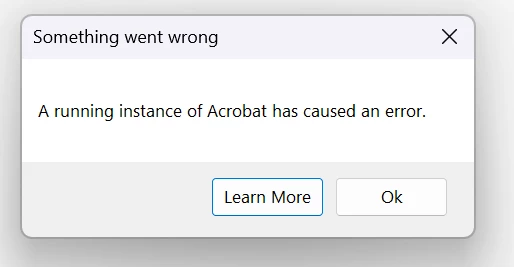
I'm running Windows 11 Update 24H2

2 replies

AnandSri
Legend
Jan 16, 2025 12:27 PM UTC

Hello,


I hope you're doing well, and we apologize for the trouble.


Please see this article and try the solution: Error: A running instance of Acrobat has caused an error.


Let us know how it goes.


Thanks,

Anand Sri.

Translate
kglad
Community Expert
Community Expert
Jan 15, 2025 6:49 PM UTC

in the future, to find the best place to post your message, use the list here, https://community.adobe.com/

p.s. i don't think the adobe website, and forums in particular, are easy to navigate, so don't spend a lot of time searching that forum list. do your best and we'll move the post (like this one has already been moved) if it helps you get responses.


<"moved from cc desktop bugs">
Translate