Participant
January 18, 2011
Question

Acrobat X - Cannot combine files with digital signatures

  • January 18, 2011
  • 5 replies
  • 26679 views

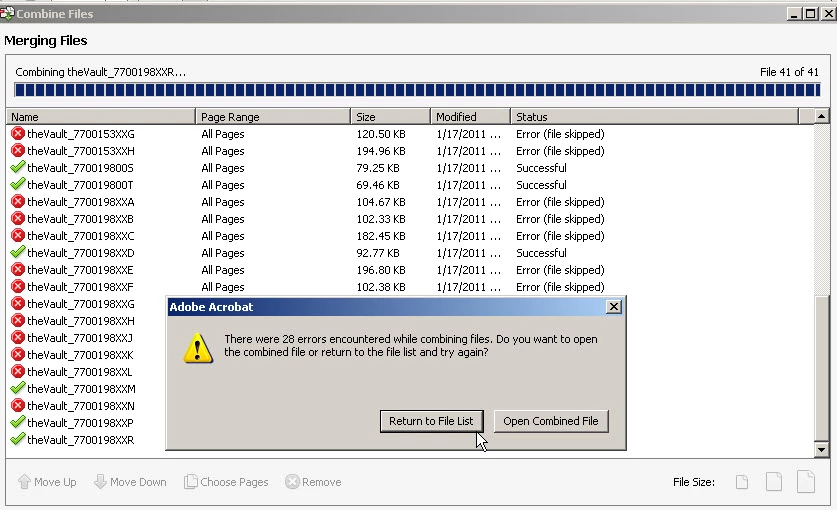
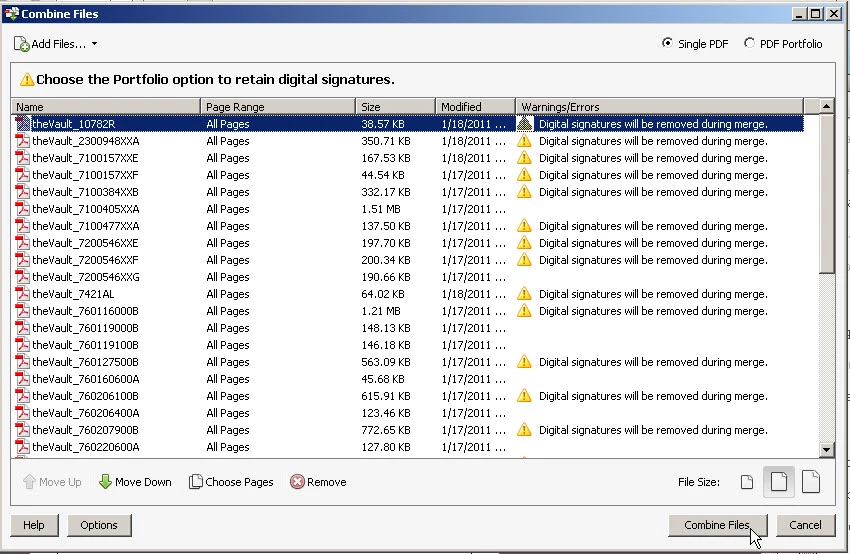
We recently upgraded to Acrobat Pro X (from Acrobat Pro 7).  For many years, we have been using the digital signature feature to "approve" documents.  Frequently, we have the need to combine many (from several to hundreds) of these "approved" documents (with digital signatures) into one .pdf file.  However, Acrobat X Pro will not let us combine these files into one file.  When we try this, the first screen(first image below) indicates that the digital signatures will be removed during merge.  However, when we proceed, we get an error message (2nd image below) for all of the files with digital signature.

So my question is: How can we combine many .pdf files with Digital signatures into one new file?

(We need for users with previous versions to be able to open this new file, and we need to place a watermark on the file).

Thanks in advance for any help!
    This topic has been closed for replies.

    5 replies

    FrixkyKitty
    Participating Frequently
    January 15, 2021

    1. Open the signed pdf in Adobe.
    2. Open print dialogue (Ctrl+p)
    3. Change the printer to "Microsoft Print to PDF" then print.
    4. The newly created PDF will have the signatures and will behave as a normal pdf for combine/merge activities.


    Legend
    January 15, 2021

    EdZooks, thanks, but that is nonsense. The file will NOT have the signatures. Printing cannot preserve digital signatures, only pictures of signatures, which are useless and not legally valid

    FrixkyKitty
    Participating Frequently
    March 16, 2021

    "Test Screen Name's" comment deserves some consideration.  My suggested approach converts the digitally signed document to a standard pdf.  The result displays the signature information but the underlying digital signature is lost.  In my case the original signers understand the distinction. 


    Creating a summary file is my goal.  I combine a variety of digitally signed, along with other related, documentation into a single summary pdf.  The original, digitally signed documents, are stored for future reference.  I am increasingly convinced that it is not possible to combine digitally signed documents into a single, summary pdf, while maintaining the underlying digital signatures.  


    Users needing summary packets will benefit from my suggested approach.  However as "Test Screen Name" suggests, my approach remains "legally valid" to the extent that the original digitally signed documents are available on demand.

    Participant
    July 25, 2011

    I am with you Kevin!  Adobe, are you listening?  This question is not answered!  We need a solution for Acrobat X!

    Inspiring
    July 26, 2011

    his is a U2U forum. I suggest that you use Feature Request/Bug Report Form and Adobe will be notified of the problem.

    Participant
    May 19, 2011

    So, Acrobat X does not have the Portfolio option available, only the Pro version, so, now what?  This is a program problem, and it needs to be fixed by Adobe.  My old version works great, and I bought 9 copies of this Acrobat X stuff, only to find it doesn't work correctly!  Any other suggestions?

    January 20, 2011

    This is a known issue in Acrobat X, with combination of PDF(s) with digital signatures as "Single PDF".

    As a work around, you could combine the PDF(s) into a PDF Portfolio.

    Regards,

    Devyani.

    Participant
    July 25, 2011

    Do you have a work around for Acrobat X?  We do not have pro, and cannot make this work!


    July 26, 2011

    Please patch to Acrobat 10.1, the issue is fixed herein.

    Bernd Alheit
    Community Expert
    Community Expert
    January 18, 2011

    Combine the files as portfolio.