
jannay64367343
Participant
December 14, 2015
Answered

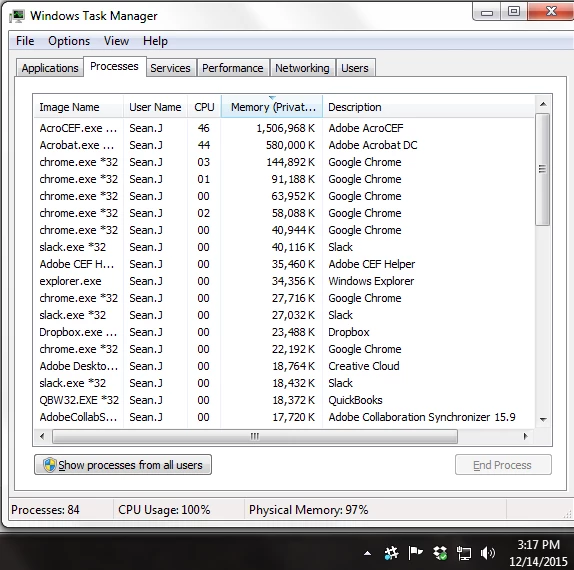
AcroCEF consumes all memory and CPU resources whenever Acrobat DC is launched. What is this process, and how can it be turned off?

  • December 14, 2015
  • 6 replies
  • 59133 views

I should mention that Acrobat DC is being run in compatibility mode for Windows XP Service Pack 3, and as an administrator, both as suggested by similar posts in these forums.

Running Windows 7 Professional SP1, on a Dell OptiPlex 745 with Intel Core2 Duo CPUs (E7500@2.93GHz each) with 4GB of RAM, configured as a 64-bit system.

Earlier versions of Acrobat did not have this problem.

Even without a single PDF file open, AcroCEF expands its hold on memory and CPU until eventually it consumes 2GB and crashes. In the process it also expands the memory footprint of Acrobat DC and slows the entire station down to a crawl. Once CEF crashes it will simply start again. If Acrobat is closed, the CEF process continues until it crashes. I now keep task manager open at all times, and limit use of Acrobat to the least possible time, during which I periodically end the CEF process tree to avoid a system stall. As soon as I close out of Acrobat, I end the CEF process tree again. Even after CEF crashes, DC continues to consume more memory until it also maxes out at half of the physical RAM.

Acrobat has gone from a critical part of my workflow to a system hazard to be avoided at all costs. All because of DC and its worm-like CEF process. I've reinstalled Acrobat twice (full removal-reinstall). Despite having paid a subscription for Acrobat, I am looking for other PDF editors that are less damaging to the system.

What is this process, and how can I avoid launching it?
This topic has been closed for replies.
Correct answer Sunil_Soni

Hello Everyone,

Sorry for the inconvenience caused to you.

AcroCEF is detachable part of Acrobat. AcroCEF takes care of HTML based components of the application like(Send for signature, Send and Track, fill and sign, Document Cloud, etc). Killing AcroCEF process or renaming/deleting AcroCEF executable would lead to lack of functionalities, please NEVER do that.

I would request you all to update application via Help->Check for updates... menu and provide following information if still facing issue:

  • Application version
  • Platform/OS infromation
  • Screenshot of Task Manager(make sure Acrobat and AcroCEF processes are visible with Memory usage and CPU usage information)
  • Please share the exact steps, when started observing the issue.

-Thanks for your cooperation

Sunil Soni

6 replies

Participating Frequently
November 7, 2016

I also have the same problem on Windows 10 Pro, for the latest and up to date Acrobat Pro DC.

robertd73460362
Participant
April 3, 2017

Same here: latest Win10 latest Adobe 'stuff.' I always see two (2) instances of AcroCEF starting up, massive consumption of disk & CPU. Using Task Mgr. generally takes three 'kills' to make them settle down & behave (they tend to respawn after you kill them). Adobe has adopted the Microsoft support model, it appears, as in 'the customer base is smarter than us so let's wait until one of them figure it out...'

Anyone try renaming the files so they can't be invoked? Updates would be a pain (rename/run/rename) but it might be more effective in the long run.

Sunil_Soni
Adobe Employee
Sunil_SoniCorrect answer
Adobe Employee
April 13, 2017

Hello Everyone,

Sorry for the inconvenience caused to you.

AcroCEF is detachable part of Acrobat. AcroCEF takes care of HTML based components of the application like(Send for signature, Send and Track, fill and sign, Document Cloud, etc). Killing AcroCEF process or renaming/deleting AcroCEF executable would lead to lack of functionalities, please NEVER do that.

I would request you all to update application via Help->Check for updates... menu and provide following information if still facing issue:

  • Application version
  • Platform/OS infromation
  • Screenshot of Task Manager(make sure Acrobat and AcroCEF processes are visible with Memory usage and CPU usage information)
  • Please share the exact steps, when started observing the issue.

-Thanks for your cooperation

Sunil Soni

Participant
November 1, 2016

I also have the same problem!

Acrobat Pro DC (Classic),2015, Version 2015.006.30243

Participant
October 4, 2016

Same problem here!!

joe-jrj
Participant
October 24, 2016

Ditto,

since there appears no fix from Adobe, I've gone back to Acrobat 11.

Maybe if enough people abandon their latest product, they'll actually fix it.

August 1, 2016

I am having the same issues with AcroCEF.exe using a large number of resources. Is there a need for this executable, and if not, what are the steps to remove?

jannay64367343
Participant
December 23, 2015

Still a problem - anyone have any other thoughts? It would be awesome to be able to use Acrobat again without the clock ticking down the minutes before my machine is toast.

AmbooS
Adobe Employee
Adobe Employee
January 5, 2016

Hi jannay64367343

Can you please try a couple of things and let me know your observations:

1. Restart your Windows machine and try launching Acrobat again. Do you see multiple AcroCEF.exe running in task manager? Do you still see high CPU/memory getting consumed?

2. Launch Acrobat and go to My Computer in Home. Do you see the right hand side view displayed correctly (a Browse button and the recent locations shown) or you see a blank view?

Thanks,

-Amboo

March 16, 2016

I just ran into this issue for a customer. Found that when I launch Acrobat DC Pro (15.10.20056)  alone it works fine, but when I open any type of PDF acrocef.exe starts up and keeps launching itself and closing (secondary ones open and close, primary stays open) and the primary one eats up about 50-70% cpu immediately and the consumed ram just grows without stopping.  If I close out of Acrobat it goes back to normal. 

I ran into a few 'fixes' online with compatibility mode that do not work.  Can anyone help?  Reader works fine by the way, just not this program. 

jannay64367343
Participant
December 14, 2015

Acrobat DC details:

File Version = 15.9.20069.28170

Product Version = 15.9.20069.159242

AadeshSingh
Community Manager
Community Manager
December 15, 2015

Hi jannay64367343,

AcroCEF.exe is a file that is used to check the updates.

Please download & install the updates Acrobat Help | Release Notes | Acrobat, Reader. Restart your system & check if there is any change.


Regards,

Aadesh

jannay64367343
Participant
December 16, 2015

That was promising. Did what you suggested. Am now running Acrobat Pro DC 2015 Release (Continuous) Version 2015.009.20079, which is the most current update available at Overview — Acrobat and Adobe Reader Release Notes.

The problem is unchanged. AcroCEF and Acrobat DC are still destroying my system's performance. Resource hogging is unabated.

Any other suggestions? Can AcroCEF be turned off?