

Turan_Elkhan
Inspiring
April 1, 2024
Answered

AcroDialog Popup List update/store value

  • April 1, 2024
  • 2 replies
  • 536 views

Hello dear community. I am trying to update or save the value from the previous selection in the pop-up list. The "Name" and "Surname" fields are fine, but the pop-up list ("Title") is not. Can anyone help me with this? When the user clicks the button, the value from the previous selection should be displayed. Any help would be appreciated.
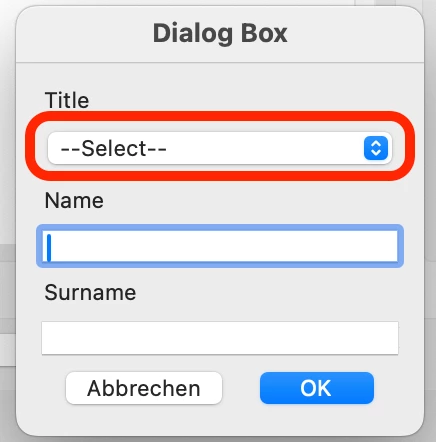
 

list_Titl = {"--Select--":-1,"Ms":-1,"Mrs":-1,"Mr":-1};
var oDlg = {
	strTitle:null,
	strEdt1:null,
	strEdt2:null,
	GetListSel:function(oLst){for(var x in oLst){if(oLst[x]>0)return x;}return null;},
	initialize:function(dialog){
		var oInit = {
			Titl:this.strTitle,
			Name:this.strEdt1,
			Snam:this.strEdt2,
			Titl:list_Titl
		};
		dialog.load(oInit);
	},
	validate:function(dialog){
		var bRtn = true;
		var oRslt = dialog.store();
		return bRtn;
	},
	commit:function(dialog){
		var oRslt = dialog.store();
		this.strTitle = this.GetListSel(oRslt.Titl);
		this.strEdt1 = oRslt.Name;
		this.strEdt2 = oRslt.Snam;
	},
	description:{
		name:"Dialog Box",
		elements:[{type:"view",elements:[
		{
			type:"view",
			item_id:"Vew1",
			alignment:"align_fill",
			align_children:"align_left",
			elements:[
				{
					type:"static_text",
					item_id:"Sta1",
					name:"Title",
				},
				{
					type:"popup",
					item_id:"Titl",
					alignment:"align_fill",
				},
				{
					type:"static_text",
					item_id:"Sta2",
					name:"Name",
				},
				{
					type:"edit_text",
					item_id:"Name",
					width:35,
					alignment:"align_fill",
				},
				{
					type:"static_text",
					item_id:"Sta3",
					name:"Surname",
				},
				{
					type:"edit_text",
					item_id:"Snam",
					width:35,
					alignment:"align_fill",
				},
			],
		},
		{
			type:"ok_cancel",
		},
	]}]
	}
};

oDlg.strTitle = this.getField("Title").value;
oDlg.strEdt1 = this.getField("Surname").value;
oDlg.strEdt2 = this.getField("Name").value;

if ("ok" == app.execDialog(oDlg)) {

	this.getField("Title").value = oDlg.strTitle;
	this.getField("Surname").value = oDlg.strEdt1;
	this.getField("Name").value = oDlg.strEdt2;

}


This topic is closed to new replies. Start a new post to keep the conversation going.
Correct answer Thom Parker

This looks like custom dialog code created with AcroDialogs

There is a slight error in the code generation. The initialize function should not be using the input value for the dropdown directly. The only value that can be loaded into a list/dropdown is the list object, "list_Titl".

So the missing element here is a function for setting the selected entry in the list object to a +1. 


function SetListItem(oList, cValue)
{
    for(var nm in oList)
       oList[nm] = (nm == cValue)?1:-1;
    return oList;
}


Now this function can be used in the Initialize function 


	initialize:function(dialog){
		var oInit = {
			Name:this.strEdt1,
			Snam:this.strEdt2,
			Titl:SetListItem(list_Titl, this.strTitle),
		};
		dialog.load(oInit);


2 replies

Thom Parker
Community Expert
Thom ParkerCommunity ExpertCorrect answer
Community Expert
April 1, 2024

This looks like custom dialog code created with AcroDialogs

There is a slight error in the code generation. The initialize function should not be using the input value for the dropdown directly. The only value that can be loaded into a list/dropdown is the list object, "list_Titl".

So the missing element here is a function for setting the selected entry in the list object to a +1. 


function SetListItem(oList, cValue)
{
    for(var nm in oList)
       oList[nm] = (nm == cValue)?1:-1;
    return oList;
}


Now this function can be used in the Initialize function 


	initialize:function(dialog){
		var oInit = {
			Name:this.strEdt1,
			Snam:this.strEdt2,
			Titl:SetListItem(list_Titl, this.strTitle),
		};
		dialog.load(oInit);


Thom Parker - Software Developer at PDFScriptingUse the Acrobat JavaScript Reference early and often
Turan_Elkhan
Inspiring
April 1, 2024

Thanks, Thom. Yes, you are right, I use your AcroDialog under (https://www.pdfscripting.com/members/AcroDialogs.cfm) The function has worked for me. Thanks again for your help, Thom.