Participant
March 25, 2021
Answered

Acrotbat Pro DC "Billing Issue" Red Icon Wont Go Away?

  • March 25, 2021
  • 10 replies
  • 13267 views

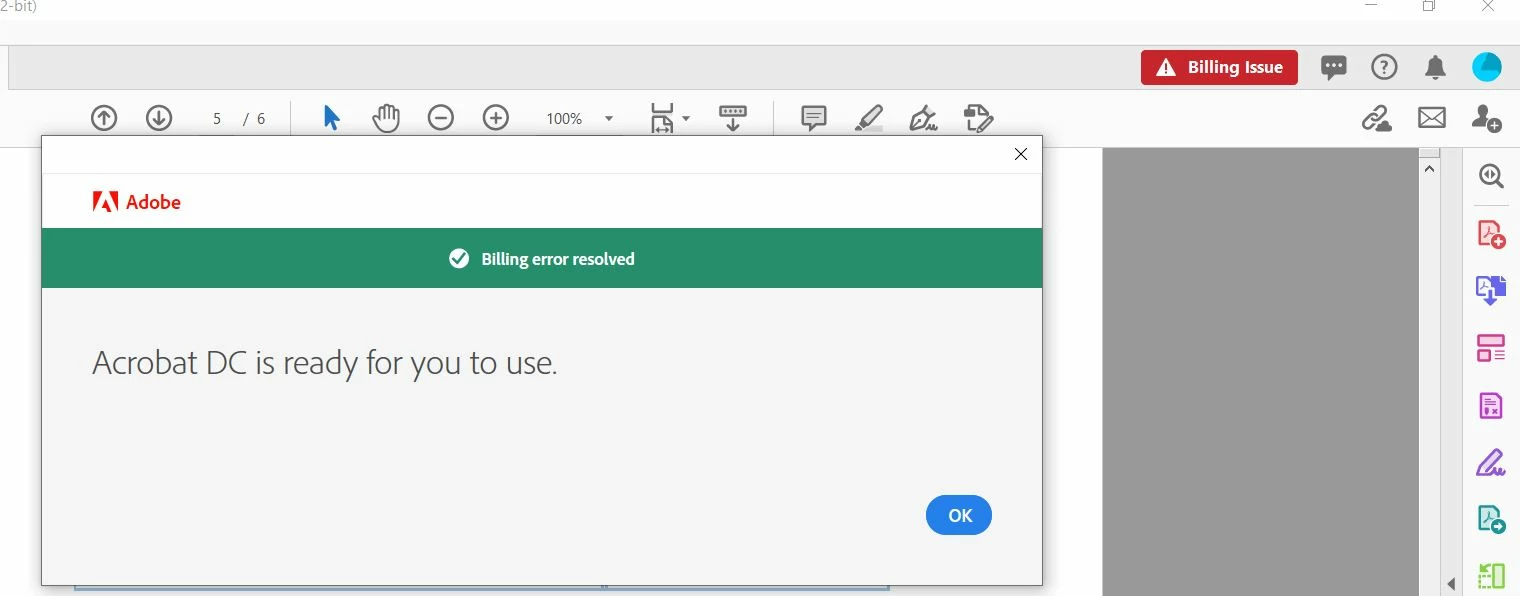
Anyone deal with a big red box "Billing Issue" icon in the top right corner of Acrobat Pro?  I've tried installing and uninstalling.  When I click on the button it says "billing issue has been resolved" but the icon won't go away.  Attached picutres.

 

Correct answer JernKoll

With help from Adobe support, I resolved a similar issue simply by signing out of the creative cloud application and signing in again. 🙂

10 replies

Participant
March 6, 2025

I have the same issue. I had already updated my payment mode and paid but the "Billing Issue" Red Icon won't go away.

I can't even access my Adobe Store. 

Meenakshi Negi
Community Manager
Community Manager
March 6, 2025

Hi YOUQUAN23645843o8ky,


Thank you for reaching out.


Please try signing out and rebooting the machine once. Once the machine restarts, sign in again. Ensure that the internet is not intermittent. The changes in the account take some time to reflect.

If that does not work, sign out of the application. Open the link https://adobe.ly/3F8MMyk   and try to sign in. 


Let us know how it goes.


Thanks,

Meenakshi

Participating Frequently
June 8, 2024

Hi,

I've had a similar issue before. Try clearing the cache and cookies in your browser and then sign out and back into Acrobat Pro. If that doesn't work, you might want to contact Adobe support directly for assistance. They should be able to help you resolve the billing icon problem.

Good luck!

Participant
June 8, 2024

Same thing, I get a pop up whenever I start a software which isnt going away 

Participant
March 14, 2024

Same Issue. I talked to the chat team and they said wait an hour, then wait 24 hours.  Completely unhelpful. Logging out and in did not resolve the issue either.

JernKollCorrect answer
Participant
January 1, 2023

With help from Adobe support, I resolved a similar issue simply by signing out of the creative cloud application and signing in again. 🙂

Participant
April 7, 2022

I am having the same issue. Please advise.

Amal.
Community Manager
Community Manager
April 7, 2022

Hi there


Have you tried the steps shared in the discussion shared earlier?


Regards

Amal

Participant
April 8, 2022
Participant
March 18, 2022

I am having this same issue.  Updated dpayment info, everything seems current, still see a red button that says billing issues.  When I click on it, it says it's resolved, but won't go away.

Amal.
Community Manager
Community Manager
March 18, 2022

Hi there


Hope you are doing well and sorry to hear that. Please go through the correct answer marked in the similar discussion https://community.adobe.com/t5/download-install-discussions/billing-issue-resolve-now/td-p/10982609#M79840 and see if that works.


Regards

Amal

Known Participant
October 19, 2021

I have the same issue. How can i resolve?

Participant
November 8, 2021

Same here.  Seems like this is related to the new personal/business account "features".  So far they have caused many issues for us.  

Participant
August 3, 2021

Hey there, I was also facing the same issue. Could you please provide me the resolution, If it was resolved.


Amal.
Community Manager
Community Manager
August 4, 2021

Hi Prabhdeep


I have shared more details with you in private message. please check.


Regards

Amal

Participant
August 16, 2021

I have the same problem - red box in the top right corner saying "Billing Issue".

Amal.
Community Manager
Community Manager
March 25, 2021

Hi there


Hope you are doing well and sorry for the trouble. As described, you are getting the billing issue icon on top right corner of the application and when you click on it it says that the issue has been resolved.


I have cheked the Adobe account linked with the email you are using on this community and found that there is some billing issue on your account. I have shared more information in Private message, please check.


Regards

Amal


Participant
March 1, 2022

I am having the same issue. Please advise.