
Participant
November 10, 2023
Question

Acrotray and Distiller FLOODING processes

  • November 10, 2023
  • 1 reply
  • 1720 views

Recently I have seen this problem with a few users who we have CC All apps licenses installed. Seemingly randomly, Distiller and Acrotray will replicate processes and nearly take over the machine. The popup window will say something along the lines of "Another instance of Distiller is busy starting up" and there will be hundreds of these Windows. I haven't been able to pinpoint what is causing this. This is what the Task manager will look like when a computer is being assaulted by Distiller. Note that it took ~30 seconds of scrolling to see a non adobe related task.
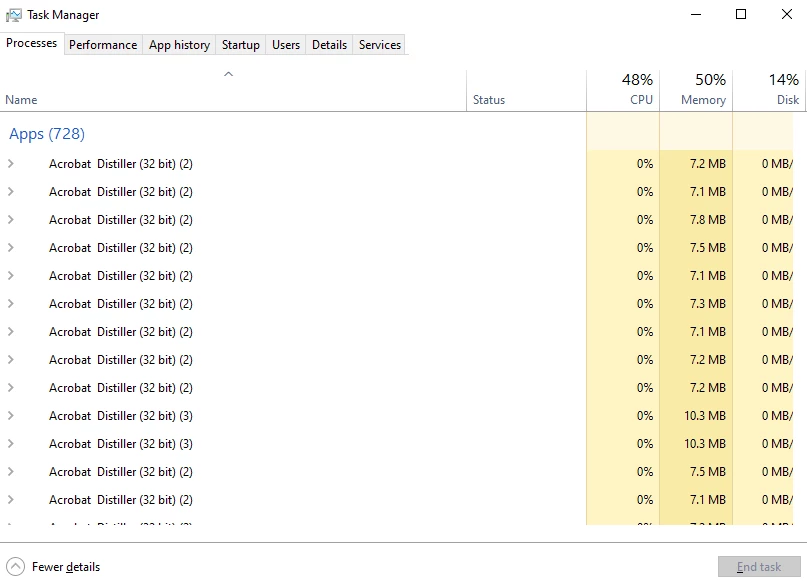
 

Has anyone else seen something like this? I have scoured the forums for a solution, but I have not found one that really sticks. This is not an isolated incident either, at least 3 different users and computers have run into this.

This topic has been closed for replies.

1 reply

Abambo
Community Expert
Community Expert
November 10, 2023

I haven't seen that until now. Did they print to the virtual Acrobat PDF printer?


What is the OS and version? Is the Acrobat version up to date? Check with the correct version number. Do not trust the “there are no updates available”.

ABAMBO | Hard- and Software Engineer | Photographer
Participant
November 10, 2023

They did not recently try to print to Acrobat PDF, or any physical printer.

OS: Windows 10 22H2, 19045.xx builds.
Acrobat Version: 23.006.20360, which I believe is the most up to date version.


One user has reported logging onto their machine first thing in the morning with all of these processes and "Another Instance of Distiller is busy starting up" windows already present.

Abambo
Community Expert
Community Expert
November 10, 2023

Very bizarre. I suppose that you have an Enterprise or Teams subscription? I would try to contact support via the admin console.

ABAMBO | Hard- and Software Engineer | Photographer