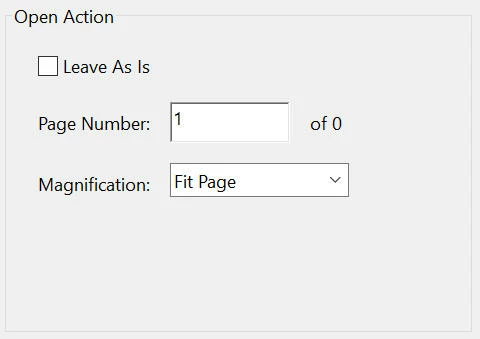
Hmmm... Interesting. So if I follow you properly, when one sets the Initial View settings (File > Properties > Initial View) and selects for example "Bookmarks Panel and Page", "Two-Up (Cover Page)", "Fit Page" and the like, these are not flags in the PDF document but actions that get executed upon opening the document, in a similar way as document JavaScript gets executed when opening the document? This would explain why the Open Action is an all or nothing... Thank you for that... A bit counter-intuitive because one could really want to leave the "Page Number" unchanged to open on whatever page it was originally decided, but still change the zoom for a good reason. Well, I just learned something, but it does not solve my problem, at least not how I wanted to solve it.
Apparently, a plugin could do the trick, but it would require me to install a C compiler and roll-up my sleves, right? I have not programmed in C in like 20 years or so.
I finally came up with a "compromise" solution where I wrote an external script with a tool called AutoHotkey. It goes through all the PDF files in a given folder, opens them one at a time, opens the "Document Properties" dialog, jumps to the "Intial View" tab, sets the desired options like Page Layout and Magnification whislt leaving the "Open to page" unchanged", presses OK and saves the file. It is probably slower that the built-in actions, but it gets the job done. The only real drawback is that I cannot use my computer while this is running.
Anyway, thank you for your time and clarifications... and you are right, the page labels vs numbers issue does surface in other areas from time to time.

 AdChoices