
Participant
December 8, 2023
Answered

Action to set page layout to single page and fit page magnification

  • December 8, 2023
  • 1 reply
  • 626 views

When publishing documents from Word to PDF I frequently go and manually change the document properties to

Page Layout: Single Page

Magnificiation: Fit Page


I know that Acrobat has capability to run action commands which include Java script; is this something which can be converted into an action button or something to just have it configure the document how I need in a single click? Any help appreicated!!
This topic has been closed for replies.
Correct answer try67

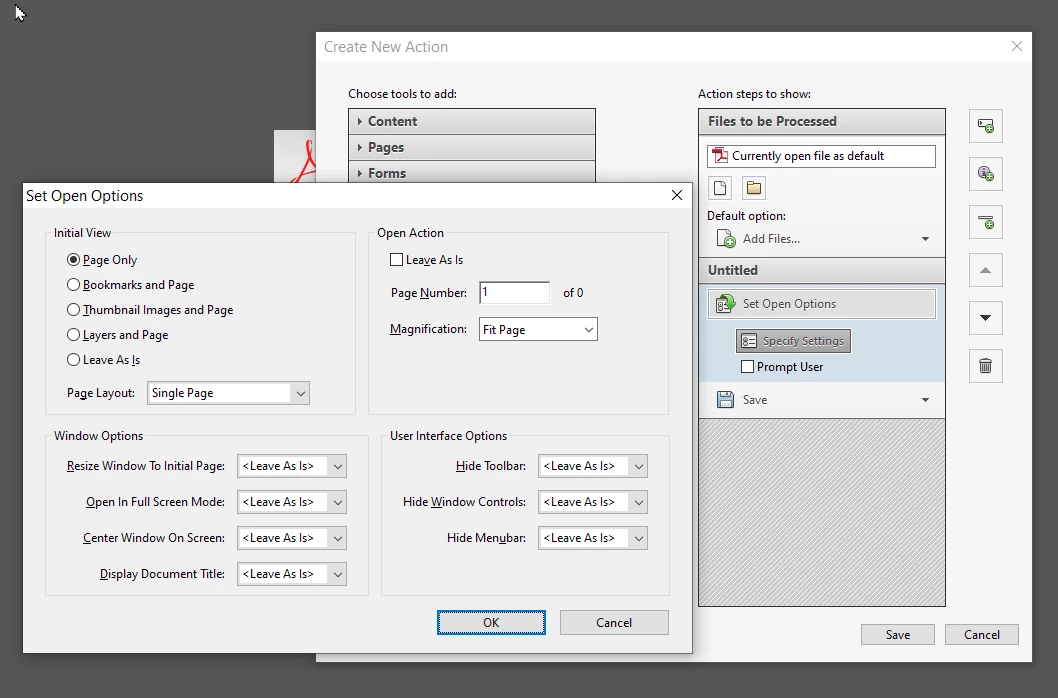
No, these settings can't be changed using JS. You can change them using the Action Wizard, though, or a Custom Command. The latter can be executed in pretty much a single click on your file. The former can be used to process multiple files in a single process.

You just need to add a Set Open Options command with the desired settings (make sure to untick the Prompt User check-box!), followed by a Save command:


1 reply

try67
Community Expert
try67Community ExpertCorrect answer
Community Expert
December 8, 2023

No, these settings can't be changed using JS. You can change them using the Action Wizard, though, or a Custom Command. The latter can be executed in pretty much a single click on your file. The former can be used to process multiple files in a single process.

You just need to add a Set Open Options command with the desired settings (make sure to untick the Prompt User check-box!), followed by a Save command:


Participant
December 20, 2023

Yep that will work for my case. Much appreciated!!