Inspiring
February 18, 2021
Answered

Activate a row of text boxes - Javascript

  • February 18, 2021
  • 4 replies
  • 2384 views

Hello

I'd like to grey out a row of boxes so they are inactive.


If the user selects 'other' from a dropdown box then the row of boxes become 'active', white in colour with black text.
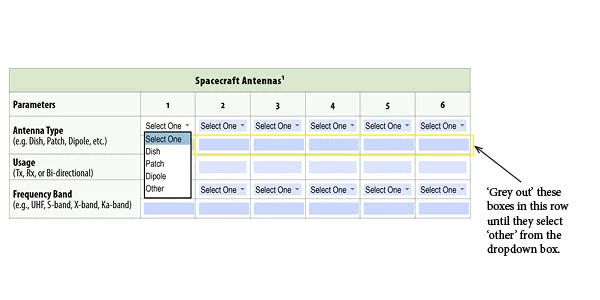

This topic has been closed for replies.
Correct answer try67

The above works only if i click the dropdown box and choose one of the options except 'select one'.


I can still type in the text field if:

I click the dropdown box and choose 'select one'.

I don't click the dropdown box and go directly to the text field.


I can not type in the text field if:

I click the dropdown box and choose one on the options apart from 'other' and 'select one'.

I choose one of the options and then change it to 'select one'.


You have to set the fields as read-only by default.

I don't understand what you mean about the "select one" option. Do you want the text fields to be enabled when it is selected?

4 replies

Nesa Nurani
Community Expert
Community Expert
February 18, 2021

Use this code in each dropdown field as "Custom calculation script" and change "xx" with your field names for that row:

var f = ["xx","xx","xx","xx"];
for (var i in f) {
this.getField(f[i]).readonly = event.value == "other" ? false : true;
this.getField(f[i]).borderColor = event.value == "other" ? color.black : ["G",0.7 ];}

try67
Community Expert
Community Expert
February 18, 2021

So the first drop-down should control all the other text fields, or do you mean that each drop-down controls the text field below it?

Inspiring
February 18, 2021

Each drop down controls the text field below it.

try67
Community Expert
Community Expert
February 18, 2021

Then you can use the following as the custom validation script of each of the drop-down fields:


var f = this.getField(event.target.name.replace("lms_antennatype_", "lms_antennatype_other_"));
if (event.value=="Other") {
	f.readonly = false;
} else {
	f.value = "";
	f.readonly = true;
}
Legend
February 18, 2021

There are no "rows" in PDF forms, just independent form fields. Since you control the field names, you can create routines that work on groups of fields, by using rules in your own code for field names.

Inspiring
February 18, 2021

Sorry. 

The question was worded wrongly.

How do i activate a text box based on what is selected in the drop down box?

The default is inactive. When they select 'other' then the text box is activated.

Inspiring
February 18, 2021

Below are the backend names for the fields.