
Participant
April 7, 2020
Question

Add/Remove points when using Area Tool

  • April 7, 2020
  • 1 reply
  • 1149 views

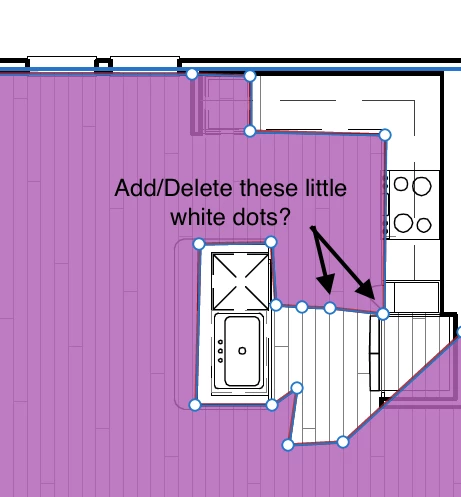
I use acrobat to scale and measure architectural drawings using the Area Tool. Is it possible to add or delete points (i.e. the little white dots) in a selected area? Right now, if I notice a mistake I have to delete the entire measurement and start again or add a bunch of dummy points just in case I need to move/redistribute them. Thanks!
    This topic has been closed for replies.

    1 reply

    Participant
    July 11, 2022

    You ever figure this out because I'm either going to a) throw my laptop out the window or b) go back to the old way (from Friday lol) with a ruler 

    owltoeAuthor
    Participant
    July 11, 2022

    Nope. What I do now is add extra white dots when I am doing my intital selection. Just in case. Then I will hopefully have enough to do what I need by just rearranging them. If I have too many I just line them up.

    try67
    Community Expert
    Community Expert
    July 11, 2022

    It's possible to do it using a script, but it's a bit tricky. If you're interested in purchasing such a tool this is something I could develop for you, for a fee. Contact me privately to discuss it further, please.