
Participant
November 30, 2018
Question

Adding Missing Content to Content and Tags Panel for Accessibility

  • November 30, 2018
  • 3 replies
  • 5111 views

I have a scanned document and Adobe Acrobat Pro has recognized the text and added it to the content and tags panel.

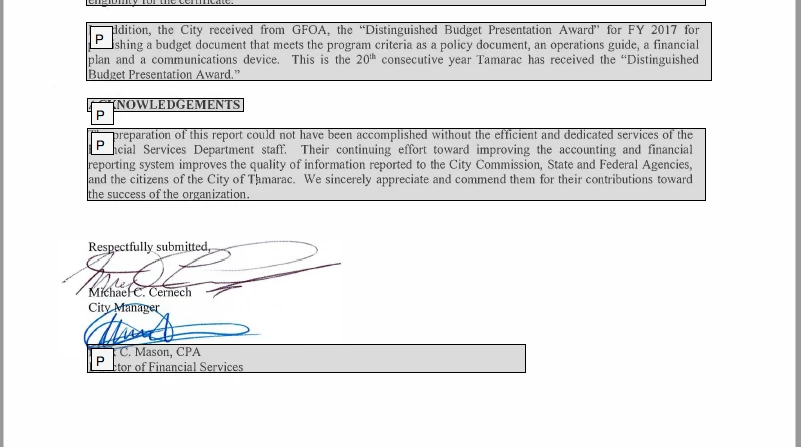
However, the process skipped over a block of signatures. I don't have any content in the Content Panel, and of course nothing in the Tags Panel.

I need (in my head) to select each signature using the Touch Up Reading Order Tool, declare it to be a figure, and then add Alternative Text to the figure. Since the section is part of the background Artifact of the entire page, I can't figure out how to select just that one part of the image. Anyone else know how to do this?
3 replies

Dave__M
Community Expert
Community Expert
December 3, 2018

As stated, use the TURO tool to draw a marquis around the desired signature/figure.  It sometimes takes a few tries to get just what you want in the way of a selection.  Also, you can add to a selection with the shift key and drawing another box, or remove areas with the ctrl key.

Good luck.

My best,

Dave

Participant
December 3, 2018

Hi Dave, Bevi

Thank you for the response, but I'm afraid I'm not correctly communicating the problem. When I look at the Content and Tags panels, there is nothing there for me to grab. I have repeatedly tried to use the TURO and draw and marquee selection around the signatures, but there is nothing there. The only place I can see them is in the content: image background artifact. Are you suggesting that I select that whole graphic and give it the Alternative text for what is missing, then change the reading order? Thanks. Please see attached screen shots.

Dave__M
Community Expert
Community Expert
December 3, 2018

Interesting.  Without hands on the document, I am going to make some guesses.  Zoom in to the signature area of the page and see if that will help in selecting.  This is an extremely finicky tool.  Make your selection bigger than you think at first... simply to see if it will pick anything up in the marquis drawing.  If so, you can refine your selection in later attempts.

I would also restart your computer, and relaunch Acrobat, if that is an option.  I only have the Windows version installed currently, so I can't do much as far as troubleshooting a Mac-centric issue... if that is the case.

Another thing to try is to attempt this routine on another computer if possible.  Perhaps that could isolate the issue to your machine or installation.  A repair installation may be needed.

My best,

Dave

Bevi Chagnon - PubCom.com
Legend
December 3, 2018

Very difficult to extract the graphic/signatures from the text in the background. But give it a try with the TURO tool.

We've had some success running AutoTag in the Accessibility tool panel. Acrobat's AI has progressed along to be able to sometimes figure out the 2 elements, text vs. graphic.

|    Bevi Chagnon   |  Designer, Trainer, & Technologist for Accessible Documents ||    PubCom |    Classes & Books for Accessible InDesign, PDFs & MS Office |
Participant
December 3, 2018

Thanks, Bevi, but that doesn't work on this document. There is literally nothing to grab with the TURO once the OCR has been run. (It converts the original scan to an Artifact). I have tried just adding Tags, but since there is nothing to associate the Tag with in the Content panel, it also blocks me from getting a clean Accessibility Report.

Bevi Chagnon - PubCom.com
Legend
December 3, 2018

Have you tagged the document after OCRing it?

Can't use TURO until after tags have been added.

|    Bevi Chagnon   |  Designer, Trainer, & Technologist for Accessible Documents ||    PubCom |    Classes & Books for Accessible InDesign, PDFs & MS Office |
Participant
December 3, 2018

Anybody have any thoughts on this?