Participant
December 5, 2018
Answered

Adding text

  • December 5, 2018
  • 2 replies
  • 657 views

I am trying to Add Text to a simple PDF.  When the "Add Text Comment" box comes up, it does not let me change the font or the size.

One time it took like 5 minutes for it to be changeable, now it doesn't work at all.  What's up?

This topic has been closed for replies.
Correct answer jane-e

Two things to check, cjneper

  1. Double click the Add Text Comment box after it is on your page and type something in. This should open the Aa "Text Properties" control as shown. Do you see that? Select your text and make changes.
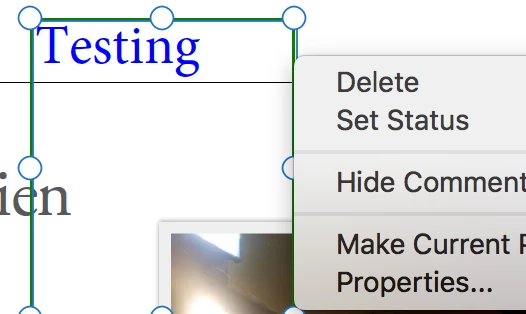
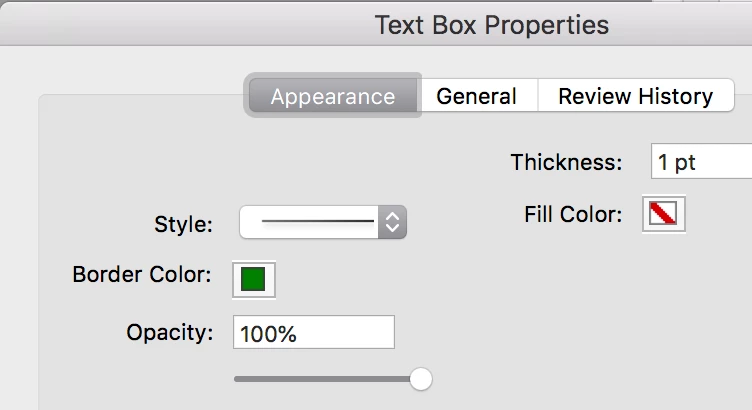
  2. Right click the selected box and choose Properties. Confirm the Appearance, especially that the opacity is not too low.

2 replies

jane-e
Community Expert
jane-eCommunity ExpertCorrect answer
Community Expert
December 11, 2018

Two things to check, cjneper

  1. Double click the Add Text Comment box after it is on your page and type something in. This should open the Aa "Text Properties" control as shown. Do you see that? Select your text and make changes.
  2. Right click the selected box and choose Properties. Confirm the Appearance, especially that the opacity is not too low.

jane-e
Community Expert
Community Expert
December 10, 2018

Have you clicked on the page?

Please show a screen shot if it still doesn’t work. Which typeface are you using?