

BaileyBunny
Participant
April 24, 2020
Question

Adding Text to an already fillable form

  • April 24, 2020
  • 2 replies
  • 688 views

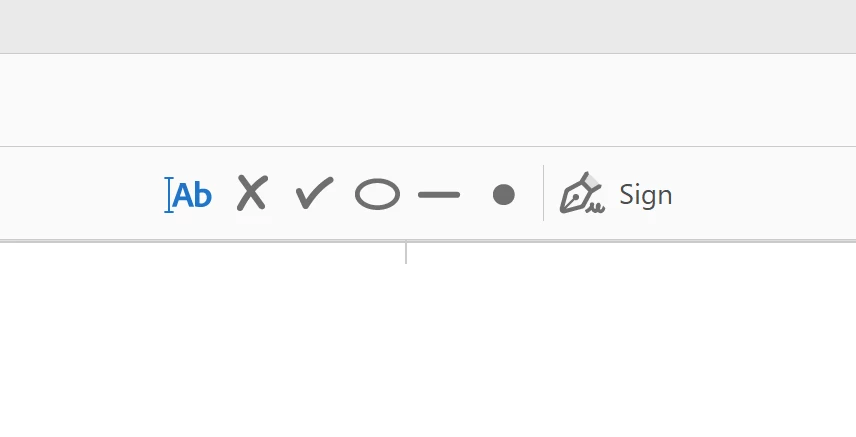
I have Adobe Acrobat Pro (2017). Is there a way that I can add text the way I can on a non fillable form when using a fillable form. What I find is that since it already has designated fillable fields, the only thing I can do to a fillable form is sign it. Why does it remove my ability to cross things out, put a line through it, add text, etc.? I feel that their should be a way around this since I have the ability to do both using Acrobat Pro. I have attached a picture. I want to be able to have this task bar when working on a fillable form as well as a nonfillable form. 

Is there a way??
This topic has been closed for replies.

2 replies

Bernd Alheit
Community Expert
Community Expert
April 25, 2020

You can use the comment tools. Use Tools > Edit PDF and you can add text.

BaileyBunny
Participant
April 26, 2020

That is a great idea! However, I would like to figure out a way to make sure that when I or someone else creates fillable forms for the agency I work for, everyone else that has Adobe Acrobat Reader DC can use it to not only fill in the form and add their signatures, but also add text outside the fillable areas like they can with a nonfillable form if needed.

Bernd Alheit
Community Expert
Community Expert
April 26, 2020

Not possible.

try67
Community Expert
Community Expert
April 25, 2020

You've converted the form to an Adobe Sign one, which limits what you can do with it.

Click on Tools - Prepare Form and then click on "More" at the right side of the window and then on "Revert to Acrobat Form". In the future, do not tick the box that says "This document requires signatures" when creating the form.

BaileyBunny
Participant
April 26, 2020

That is very helpful, but when I follow those steps that is not an option. The only option says "Convert to Adobe Sign Form" and I still only have the option of signing at the top.

Any thoughts?