
Participant
February 27, 2019
Question

Adobe Acrobat 2015 Updater Fails - Error 1309

  • February 27, 2019
  • 15 replies
  • 10500 views

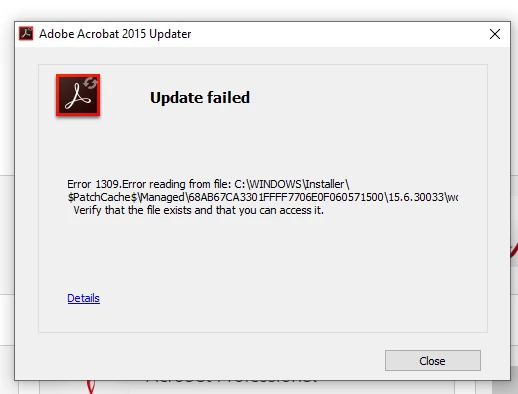
The following error message appears every time I try to run the update.  The folder referenced does not exist so there is no way to "verify the file exists and you can access it"  O have uninstalled and reinstalled 3 times and get the same results.  It appears the update file being sent by Adobe is corrupt.  Suggestions???
This topic has been closed for replies.

15 replies

Participating Frequently
February 28, 2019

This is a result of the latest Windows 10 Cumulative update.  Prior to that update, this and other Acrobat patches applied fine.  There are a few threads prior documenting this.  I personally tested this via VMs where the patch would apply on a pristine build of Windows 10 prior to February, and fail on the same system (reverted via VM snapshot) patched up through February.

Adobe's going to need to either have MS undo what they have done, or come up with all-new patches that will bring installs up to current (sometimes that requires more than just the latest patches, interim/prerequisite patches are first installed).

Participating Frequently
February 28, 2019

I figured it would have to do with Windows update. Every time there's a Windows update some of the programs start having issues.

Participating Frequently
February 28, 2019

I guess we just have to wait for a decent update to come up.

AkanchhaS8194121
Legend
February 28, 2019

Hi All,

As the error message shared above, Error 1309: error reading the file "verify the file exists and you can access it"

This error occurs when the installer is unable to write a file due to a permissions issue or system error. To resolve error 1321 or 1309, update the privileges on the parent folder of the file or source listed in the error message.

Refer to the troubleshooting steps suggested in the help article here: Error 1321 or 1309 when installing Adobe Creative Suite 5.5, CS5, or CS4 on Windows 

Once done, let us know the result.

Thanks,

Akanchha

Participating Frequently
February 28, 2019

I have the same exact issue, but the troubleshooting steps do not include Windows 10. However, my Windows 10 privileges are already set to Administrator. Any suggestions?

Participating Frequently
February 28, 2019

I have the same exact issue on today.

I have successfully installed the Adobe Acrobat DC on Windows 10 professional.

After I sign to the Adobe Acrobat, and then select check for update, it downloads and the installs. Finally, at the end of the installation, it rollbacks and return the exact error message in this discussion.

Participant
February 28, 2019

I have the same error on Acrobat Standard continuous.

Participant
February 27, 2019

I have this exact same message just for the most recent patch of Acrobat DC 2015 Pro Desktop.