
Participant
April 3, 2018
Answered

Adobe Acrobat 2017 - Shared PDF Review

  • April 3, 2018
  • 2 replies
  • 2132 views

I am using Adobe Acrobat Standard 2017.  I am trying to setup a shared PDF review hosted on a shared drive in folder that all recipients listed in the review have access to.  They apparently can't comment or save comments.  What version of Adobe do they need to have?  Can they use Adobe Acrobat Reader or do they need the full program to make comments and see other's comments?
This topic has been closed for replies.
Correct answer AnneMarie Concepcion

I'm not experienced with Acrobat Standard 2017, but they need Reader 10 or Acrobat 10, or later. Prior to Reader X, you'd have to explicitly save a rights-enabled PDF for them to add comments. Starting with vX, comments and annotations tools are automatically enabled for most PDFs.

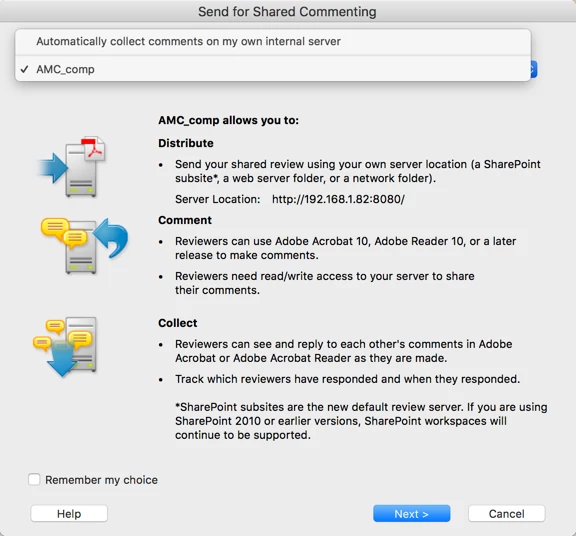
Re setting  up a shared review, are you following the setup in Acrobat? The one where you see this dialog box?

That's an official "shared review" ... I can't tell if you're just putting a PDF in a server folder or not. ;=\ That might make a difference.

AM

2 replies

AnneMarie Concepcion
Community Expert
AnneMarie ConcepcionCommunity ExpertCorrect answer
Community Expert
April 4, 2018

I'm not experienced with Acrobat Standard 2017, but they need Reader 10 or Acrobat 10, or later. Prior to Reader X, you'd have to explicitly save a rights-enabled PDF for them to add comments. Starting with vX, comments and annotations tools are automatically enabled for most PDFs.

Re setting  up a shared review, are you following the setup in Acrobat? The one where you see this dialog box?

That's an official "shared review" ... I can't tell if you're just putting a PDF in a server folder or not. ;=\ That might make a difference.

AM

dconklin8Author
Participant
April 4, 2018

Thank you for the response.  I used the "shared review" option to post to the shared folder.  I have only received one confirmation from the recipients or review group.  The one user who was able to post a comment is using Adobe Acrobat Standard 10.  I'm hoping the Adobe Reader 10 option works.  I have been told by the Adobe sales dept that we will need to purchase at least a monthly subscription to Adobe Pro DC for each user in order for them to see and post comments.

Karl Heinz  Kremer
Community Expert
Community Expert
April 4, 2018

Don't believe Adobe's sales department... Their main interest is selling licenses for Adobe Acrobat. As you can see from the screenshot, it does explicitly talk about the free Reader, so no need to get Acrobat license for users who just want to participate in the review.

You have to make sure that everybody is using Adobe Acrobat or Adobe Reader to open this document. The problem you may be dealing with is that people are opening the document in the browser, and then the browser's PDF viewer takes over. And unfortunately, in most cases this means that it will not be Adobe technology, but something that is built into the browser. So, make sure that the instructions say to open the file in Acrobat or Reader.

dconklin8Author
Participant
April 3, 2018

I accidentally marked this as Assumed Answered.  It hasn't been answered yet.