

Participant
October 1, 2024
Answered

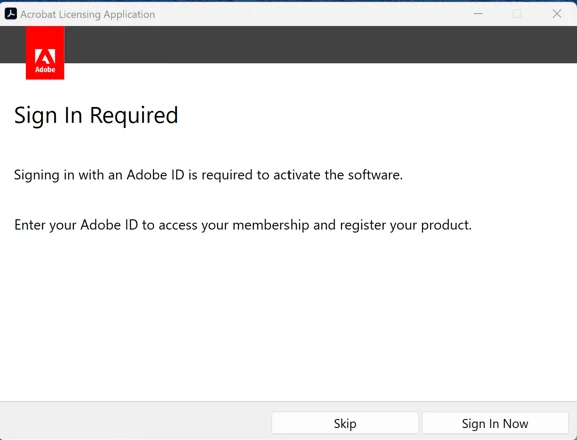
Adobe Acrobat 2020 Std no longer allows sign-in

  • October 1, 2024
  • 7 replies
  • 10640 views

We have several versions of Adobe Acrobat Standard and Pro 2020, Perpetual we've purchased through a vendor.  Have all the licenses and everything.  In the past, we've been able to apply the appropriate licensing, where we've been able to Skip signing in to use these licenses at a corporate level, not linked to individual users.

Today (10/01/24) we have been trying to install some Adobe Std 2020 versions and all of a sudden, it no longer allows us to "skip" the sign-in.  I installed this just fine 2 days ago.  I've tried on several different PC's, and it no longer allows me to skip.

I've even tried to "Sign in" with a valid Adobe account we have, and it tells us an error has occured.  We can't even install and launch any version of Adobe 2020 Std any longer, eventhough we have valid licensing.  

Is anyone else having this issue starting today?
Correct answer Toolado1111

Just to update this ticket.  I went in today (10/03/24) and installed a perpetual version of Adobe Standard 2020 using our volume license key, and it is now back working.  I was able to get the "Skip" on the signin, which wasn't there before, so Adobe has fixed whatever the issue was. 

Thanks everyone for the comments on finding out this was an Adobe issue.

Thanks Adobe for getting it fixed!!!  


7 replies

Participant
October 24, 2024

I have the same issue as of 10.24.2024 Has anyone solved it? I tried downloading the newest installation file from my account as suggested by Amal above but this did nothing. 

The never ending sign in loop still persists. 


Participant
October 28, 2024

I started to have this issue as well. Was your issue resolved? 

Participant
October 28, 2024

Only after, I had their tech support sorting it out via remote desktop. 

To contact them I used the chat option on the Adobe support page. 


The issue was that my ISP blocked out the Adobe  sign in website or something.

Try creating a WiFi hot-spot from your phone and do the sign in process via the phone connection as opposed to your home broadband. That's what did it for me at the end. 

Toolado1111AuthorCorrect answer
Participant
October 3, 2024

Just to update this ticket.  I went in today (10/03/24) and installed a perpetual version of Adobe Standard 2020 using our volume license key, and it is now back working.  I was able to get the "Skip" on the signin, which wasn't there before, so Adobe has fixed whatever the issue was. 

Thanks everyone for the comments on finding out this was an Adobe issue.

Thanks Adobe for getting it fixed!!!  


Participant
October 3, 2024

I still get the never ending sign in. I have not been able to activate my Adobe Acrobat Standard 2020. I can login into my account on the internet to post this and see that my serial number shows up but my copy is not active. Please help me, I'm a senior citizen on a limited income. Should I just request a refund from the vendor I purchased this from? I've never seen anything like this. This is the first time I have seen a problem with trying to install and activate basic software. What do I need to do? Can you please contact me and help?

Adobe Employee
October 4, 2024

Hi @Electric_Flair0572 


I would recommend to uninstall the current version present on your machine. Download and install the latest version of app from your account. If it still don't work for you, we can connect over a call to help you.


Regards

Ravi


Regards

Ravi

Participant
October 3, 2024

I just bought an Acrobat Std 2020 DVD version for $358.80 + tax and installed it, created an account and I get an endless login loop. I see that the serial number shows up in my online account but it doesn't show any verification. I scrimped and saved money to purchase this and I'm on Social Security and this is what I get. Great what do I do now as it is non returnable!

Participant
October 1, 2024

Yes, just today I am having same issue 10/1/24

got a tech to help but with no success, she told me to try to re-activate tomorrow!  😞

mean while I CAN NOT use my purchased software!   Just purchased 9/26/24


Participant
October 2, 2024

The issue seems to be fixed, was able to sign in on a Macbook.

Participant
October 1, 2024

Anyone from Adobe able to chime in and give any sort of explination?  

Participant
October 1, 2024

After about 2 hours on the phone and gettting pass around (the world?),  we were told that it is some kind of world-wide outage that should be fixed in the next 24 to 48 hours. But no specifics as to what the underlying issue might be.

Participant
October 1, 2024

Thanks for the info.  Hopefully this is the case that is causing issues.  

Participant
October 1, 2024

We are having the same issue with Adobe Acrobat Pro and Standard 2020 fomr Admin shares and manual installs.

Participant
October 1, 2024

It's the same issue with Macbooks we have 2020 Adobe licenses and cant sign in to proceed.