


Participant
April 23, 2025
Answered

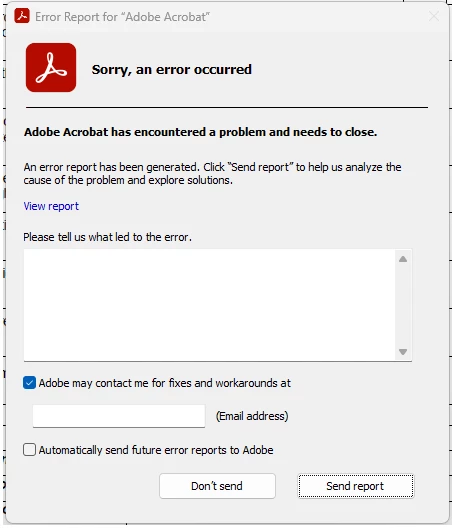
Adobe Acrobat 2025.001.20458 keeps crashing

  • April 23, 2025
  • 1 reply
  • 4250 views

I've seen this problem on three computers now where the latest update Adobe Acrobat 2025.001.20458 keeps crashing. It crashes after a 2 or more minutes when opening any pdf file. I've proved that it only happens on the latest update as the problem gets fixed when I roll back to Adobe Acrobat 2025.001.20435. 

I had to disable the automatic update in Adobe as the issue comes back once updated to 2025.001.20458.
 

I've tried running AcroCleaner (https://www.adobe.com/devnet-docs/acrobatetk/tools/Labs/cleaner.html) and deleting all Adobe folders from the following:

C:\Users\Username\AppData\Roaming
C:\Users\Username\AppData\Local
C:\Users\Username\AppData\LocalLow
C:\Program Files
C:\Program Files (x86)
C:\ProgramData
C:\Users\Username\AppData\Local\Temp

I've restarted the PC and reinstalled Adobe Acrobat 2025.001.20458 but still crashing.

This is happening on Windows 11 64bit machines. Below is a copy of error report on one of the machines:

Here’s the error report details.

<?xml version="1.0"?>
<!DOCTYPE AdobeCrashReport SYSTEM "AdobeCrashReporter.dtd">
<crashreport serviceVersion="23.0.0.202412091359_9601250" clientVersion="23.0.0.202412091359_9601250" applicationName="Adobe Acrobat" applicationVersion="25.001.20458" build="0" source="Windows-Client" crashType="n/a">
<time year="2025" month="4" day="16" hour="16" minute="37" second="31" timeoffset="600" timezone="AUS Eastern Standard Time" crsessionduration="163"/>
<user guid="316c45b4-3d20-490b-9d63-861fab8c75b6"/>
<system platform="Windows 11 Pro" osversion="11.0" osbuild="22631" applicationlanguage="en-us" userlanguage="en-AU" oslanguage="en-GB" ram="32465" machine="12th Gen Intel(R) Core(TM) i7-12700H" model="Intel64 Family 6 Model 154 Stepping 3" cpuCount="20" cpuType="8664" cpuFreq="2688 MHz" processorArchitecture="9"/>
<gpu>
<gpuinfo availability="Off Line" adapterCompatibility="NVIDIA" adapterRAM="4095 MB" caption="NVIDIA GeForce RTX 3050 Ti Laptop GPU" description="NVIDIA GeForce RTX 3050 Ti Laptop GPU" driverDate="20240831000000.000000-000" driverVersion="31.0.15.3892" videoModeDescription="" pnpDeviceID="PCI\VEN_10DE&DEV_25A0&SUBSYS_22F817AA&REV_A1\4&35750B3B&0&0008" installedDisplayDrivers="nvldumdx.dll"/>
<gpuinfo availability="Running/Full Power" adapterCompatibility="Intel Corporation" adapterRAM="2047 MB" caption="Intel(R) UHD Graphics" description="Intel(R) UHD Graphics" driverDate="20240913000000.000000-000" driverVersion="32.0.101.6078" videoModeDescription="1920 x 1080 x 4294967296 colors" pnpDeviceID="PCI\VEN_8086&DEV_4626&SUBSYS_22F817AA&REV_0C\3&11583659&1&10" installedDisplayDrivers="igd10iumd64.dll,igd12umd64.dll,igdumdim64.dll"/>
<gpuinfo availability="Off Line" adapterCompatibility="DisplayLink" adapterRAM="" caption="DisplayLink USB Device" description="DisplayLink USB Device" driverDate="20221209000000.000000-000" driverVersion="11.0.2412.0" videoModeDescription="" pnpDeviceID="USB\VID_17E9&PID_6007&MI_01\A&779F40E&0&0001" installedDisplayDrivers=""/>
<gpuinfo availability="Running/Full Power" adapterCompatibility="DisplayLink" adapterRAM="" caption="DisplayLink USB Device" description="DisplayLink USB Device" driverDate="20221209000000.000000-000" driverVersion="11.0.2412.0" videoModeDescription="1920 x 1080 x 4294967296 colors" pnpDeviceID="USB\VID_17E9&PID_6007&MI_00\A&779F40E&0&0000" installedDisplayDrivers=""/>
</gpu>
<crash exception="EXCEPTION_ACCESS_VIOLATION" exceptionCode="0xc0000005" instruction="0x00007FFAF32D3D17">
<backtrace crashedThread="0">
<thread index="0">
<stackStatement index="0" address="0x00007FFAF32D3D17" symbolname="DsrGetResourceAccount"/>
<stackStatement index="1" address="0x00007FFAF32D2E52" symbolname="DsrGetResourceAccount"/>
<stackStatement index="2" address="0x00007FFAF32C7103" symbolname="DsrGetResourceAccount"/>
<stackStatement index="3" address="0x00007FFAF32C2605" symbolname="DsrGetJoinInfoEx"/>
<stackStatement index="4" address="0x00007FFAF32C22BA" symbolname="DsrGetJoinInfo"/>
<stackStatement index="5" address="0x00000000511E4DED" symbolname="unknown"/>
<stackStatement index="6" address="0x00000000511D9E50" symbolname="unknown"/>
<stackStatement index="7" address="0x00000000511D1E44" symbolname="unknown"/>
<stackStatement index="8" address="0x00000000511A1341" symbolname="unknown"/>
<stackStatement index="9" address="0x00000000511A1562" symbolname="unknown"/>
<stackStatement index="10" address="0x0000000051197CA1" symbolname="unknown"/>
<stackStatement index="11" address="0x000000005116A379" symbolname="unknown"/>
<stackStatement index="12" address="0x00000000529B3F6C" symbolname="AIDE::PixelPartInfo::PixelPartInfo"/>
<stackStatement index="13" address="0x0000000051AD2A56" symbolname="DllCanUnloadNow"/>
<stackStatement index="14" address="0x0000000051AD2638" symbolname="DllCanUnloadNow"/>
<stackStatement index="15" address="0x00007FF7150EF9A1" symbolname="GetHandleVerifier"/>
<stackStatement index="16" address="0x00007FFAF5FE259D" symbolname="BaseThreadInitThunk"/>
<stackStatement index="17" address="0x00007FFAF7A8AF38" symbolname="RtlUserThreadStart"/>
</thread>
</backtrace>
<registerSet>
<register name="RAX" value="0x0000000000000000"/>
<register name="RBX" value="0x0000000000000000"/>
<register name="RCX" value="0x0000000000000001"/>
<register name="RDX" value="0x0000000000000001"/>
<register name="RSI" value="0x0000000000000001"/>
<register name="RDI" value="0x000002666B54C518"/>
<register name="RSP" value="0x000000DEAD7FCB60"/>
<register name="RBP" value="0x000000DEAD7FCC21"/>
<register name="RIP" value="0x00007FFAF32D3D17"/>
<register name="EFL" value="0x0000000000010246"/>
<register name="LastExceptionToRip" value="0x0000000000000000"/>
<register name="LastExceptionFromRip" value="0x0000000000000000"/>
</registerSet>

<binaryImageSet>
<binaryImage start="0x00007FF7150B0000" end="0x00007FF7156C5000" path="adobe\Acrobat.exe" version="25.1.20458.0"/>
<binaryImage start="0x00007FFAF7A30000" end="0x00007FFAF7C47000" path="ntdll.dll" version="6.2.22621.5124"/>
<binaryImage start="0x00007FFAF5FD0000" end="0x00007FFAF6094000" path="kernel32.dll" version="6.2.22621.5124"/>
<binaryImage start="0x00007FFAF4DD0000" end="0x00007FFAF51A3000" path="KERNELBASE.dll" version="6.2.22621.5189"/>
<binaryImage start="0x00007FFAF4510000" end="0x00007FFAF46A6000" path="hmpalert.dll" version="3.9.5.1820"/>
<binaryImage start="0x00007FFAF5E10000" end="0x00007FFAF5FC1000" path="user32.dll" version="6.2.22621.5185"/>
<binaryImage start="0x00007FFAF4C00000" end="0x00007FFAF4C26000" path="win32u.dll" version="6.2.22621.5185"/>
<binaryImage start="0x00007FFAF5850000" end="0x00007FFAF5879000" path="gdi32.dll" version="6.2.22621.5185"/>
<binaryImage start="0x00007FFAF5440000" end="0x00007FFAF555B000" path="gdi32full.dll" version="6.2.22621.5185"/>
<binaryImage start="0x00007FFAF5260000" end="0x00007FFAF52FA000" path="msvcp_win.dll" version="6.2.22621.3374"/>
<binaryImage start="0x00007FFAF4C30000" end="0x00007FFAF4D41000" path="ucrtbase.dll" version="6.2.22621.3593"/>
<binaryImage start="0x00007FFAF74C0000" end="0x00007FFAF7571000" path="advapi32.dll" version="6.2.22621.5124"/>
<binaryImage start="0x0000026659440000" end="0x00000266594E7000" path="msvcrt.dll" version="7.0.22621.2506"/>
<binaryImage start="0x00007FFAF6CF0000" end="0x00007FFAF6D98000" path="sechost.dll" version="6.2.22621.5124"/>
<binaryImage start="0x00007FFAF5230000" end="0x00007FFAF5258000" path="bcrypt.dll" version="6.2.22621.4746"/>
<binaryImage start="0x00000266594F0000" end="0x0000026659604000" path="rpcrt4.dll" version="6.2.22621.5124"/>
<binaryImage start="0x00007FFAF59B0000" end="0x00007FFAF5A13000" path="shlwapi.dll" version="6.2.22621.5124"/>
<binaryImage start="0x00007FFAF39C0000" end="0x00007FFAF3AEC000" path="winhttp.dll" version="6.2.22621.4830"/>
<binaryImage start="0x00007FFAF46B0000" end="0x00007FFAF46BC000" path="CRYPTBASE.DLL" version="6.2.22621.4746"/>
<binaryImage start="0x00007FFAF5A20000" end="0x00007FFAF5A51000" path="imm32.dll" version="6.2.22621.5185"/>
<binaryImage start="0x00007FFADB4C0000" end="0x00007FFADB758000" path="comctl32.dll" version="6.10.22621.5124"/>
<binaryImage start="0x00007FFAF1700000" end="0x00007FFAF17B3000" path="uxtheme.dll" version="6.2.22621.5124"/>
<binaryImage start="0x00007FFAF7630000" end="0x00007FFAF79C2000" path="combase.dll" version="6.2.22621.5124"/>
<binaryImage start="0x00007FFAF56D0000" end="0x00007FFAF5830000" path="msctf.dll" version="6.2.22621.5124"/>
<binaryImage start="0x00007FFAF39A0000" end="0x00007FFAF39B8000" path="kernel.appcore.dll" version="6.2.22621.3958"/>
<binaryImage start="0x000002665C130000" end="0x000002665C1AB000" path="bcryptPrimitives.dll" version="6.2.22621.4317"/>
<binaryImage start="0x00007FFAE79A0000" end="0x00007FFAE7AE4000" path="textinputframework.dll" version="6.2.22621.5124"/>
<binaryImage start="0x00007FFAF5B70000" end="0x00007FFAF5C47000" path="oleaut32.dll" version="6.2.22621.3672"/>
<binaryImage start="0x00007FFAEF000000" end="0x00007FFAEF135000" path="CoreMessaging.dll" version="6.2.22621.5124"/>
<binaryImage start="0x00007FFAE9050000" end="0x00007FFAE93BC000" path="CoreUIComponents.dll" version="6.2.22621.5124"/>
<binaryImage start="0x00007FFAF5300000" end="0x00007FFAF543F000" path="WinTypes.dll" version="6.2.22621.4830"/>
<binaryImage start="0x00007FFAF3BE0000" end="0x00007FFAF3C14000" path="ntmarta.dll" version="6.2.22621.1"/>
<binaryImage start="0x00000000510C0000" end="0x00000000563C8000" path="adobe\Acrobat.dll" version="25.1.20458.0"/>
<binaryImage start="0x00007FFAF61D0000" end="0x00007FFAF6A66000" path="shell32.dll" version="6.2.22621.5124"/>
<binaryImage start="0x00007FFAF5C60000" end="0x00007FFAF5E01000" path="ole32.dll" version="6.2.22621.5124"/>
<binaryImage start="0x00007FFAF6140000" end="0x00007FFAF61B1000" path="ws2_32.dll" version="6.2.22621.4746"/>
<binaryImage start="0x00007FFA90AE0000" end="0x00007FFA9120A000" path="adobe\AGM.dll" version="7.1.11.1"/>
<binaryImage start="0x00007FFAF6F90000" end="0x00007FFAF7404000" path="setupapi.dll" version="6.2.22621.2506"/>
<binaryImage start="0x00007FFAE5FB0000" end="0x00007FFAE5FD5000" path="adobe\BIB.dll" version="4.0.16.1"/>
<binaryImage start="0x00007FFA8E4E0000" end="0x00007FFA8E924000" path="adobe\CoolType.dll" version="8.3.12.1"/>
<binaryImage start="0x00007FFAF1F20000" end="0x00007FFAF2152000" path="dbghelp.dll" version="6.2.22621.3593"/>
<binaryImage start="0x00007FFAF1A00000" end="0x00007FFAF1A2E000" path="dwmapi.dll" version="6.2.22621.5185"/>
<binaryImage start="0x00007FFAD9E90000" end="0x00007FFAD9F1D000" path="msvcp140.dll" version="14.42.34438.0"/>
<binaryImage start="0x00007FFAF1420000" end="0x00007FFAF1427000" path="MSVCP140_CODECVT_IDS.dll" version="14.42.34438.0"/>
<binaryImage start="0x00007FFAF3130000" end="0x00007FFAF315D000" path="IPHLPAPI.DLL" version="6.2.226...


Correct answer AnandSri

Hi Anand, I’m also facing the same problem. Could you please share the solution here?


Hello @steven_david1975


I hope you are doing well, and thanks for reaching out. Could you please share more details? Does the app crash when you open it, or while using any specific tool, or while viewing PDFs? Are you on a Mac or Windows machine, and what is the version? 

Please ensure you have the latest version of Acrobat installed on the machine: 25.001.20630 Planned update, Aug 18, 2025. Check for any pending updates from the Menu > help > check for updates, install the updates, restart the app and the machine, and try again. 


For testing purposes, create a test user profile, install Acrobat, and check the performance. You can also try a clean reinstallation using the Acrobat Cleaner tool, restart the machine, ensure the operating system is updated to the latest version, and install Acrobat. 


If the issue continues, please provide the following information: the current version of the operating system on your device and the logs from the affected machine. To collect the logs, download and run the Log Collector tool. Make sure to select all log options and attempt to reproduce the issue. After that, close the Log Collector tool; it will generate the logs along with a log ID. Please share this log ID with us for further investigation.


Thanks,

Anand Sri.

1 reply

Meenakshi Negi
Community Manager
Community Manager
April 23, 2025

Hi GKM25EFB,


Thank you for reaching out.


Please try the troubleshooting steps suggested in the following help document: https://adobe.ly/3EkQWmL

If the issue still occurs, please collect the crash logs using the diagnostic tool. We will then check them.


Let us know how it goes.


Thanks,

Meenakshi


GKM25EFBAuthor
Participant
April 24, 2025

Hi Meenakshi, I've done all of that. This is not happening only on one machine. The latest update 2025.001.20458 just keeps making Adobe Acrobat crash. I had no other choice but to roll it back to 2025.001.20435 and disable the auto update in Adobe Acrobat and Creative Cloud. I am hoping Adobe will fix this with a new update.

AnandSri
Community Manager
Community Manager
April 24, 2025

Hello!


I hope you are doing well, and we are sorry for the trouble.


Could you please check if you have any pending updates of the latest Acrobat build from the menu > help > check for updates? If you see a new update, please install it, restart the app and, if possible, the machine, and check if the app still crashes.


If the issue continues, please collect the crash logs from the affected machine and share them with us for further investigation. Download the log collector tool, run it, reproduce the issue, and then close the tool. It will generate the logs, which you should save locally. You can either attach the logs to this community thread or upload them to a cloud storage service and share the link with us. If the tool generates a log ID, please capture that and share it as well.


Thanks for your time and for your cooperation on this.

Anand Sri.
