
Participant
November 1, 2017
Answered

Adobe Acrobat 9 Standard quit working on Windows 10 machine

  • November 1, 2017
  • 2 replies
  • 1262 views

I have an installation of Adobe Acrobat 9 Standard running on a Windows 10 machine.

It has successfully run but recently locked up.

I uninstalled and reinstalled the program but no success.

Within 10 seconds of launching, the memory and CPU usage on the box climb and the program becomes unresponsive.
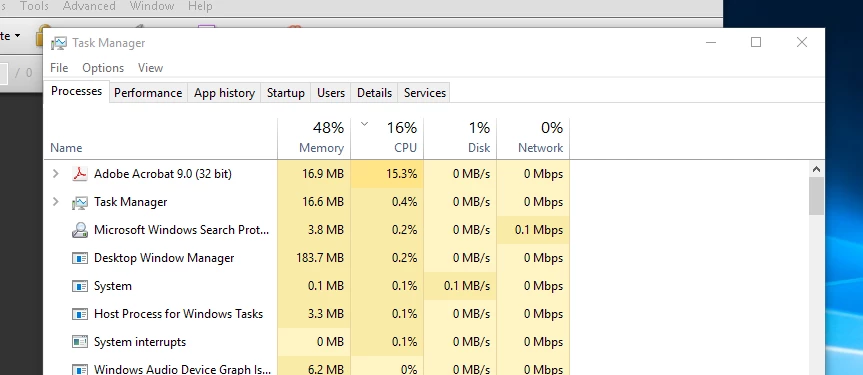
It runs successfully on another Windows 10 box I have... any ideas?

Thanks in advance.

Tim

This topic has been closed for replies.
Correct answer try67

Acrobat 9 is very old and not compatible with Windows 10. Problems are to be expected.

Your best chance is to run it in Compatibility Mode with a previous version, like Windows 7 or even XP.

2 replies

timsheaAuthor
Participant
November 1, 2017

It successfully is running on another windows 10 Machine (same Windows Build) without Compatibility mode.

I tried Compatibility mode (tried Windows 8 & XP SP3) on the machine that did not help.

Other suggestions?

try67
Community Expert
Community Expert
November 1, 2017

That's exactly the issue. It might work perfectly on one machine and not at all on another, or it might work perfectly one day and the next day all kinds of problems might happen. Because it's not compatible there are no guarantees as to how (if at all) it will work.

And since it's not a supported version there won't be any fixes or updates for it. If it works for you, great. If it's not, you're basically out of luck.

try67
Community Expert
try67Community ExpertCorrect answer
Community Expert
November 1, 2017

Acrobat 9 is very old and not compatible with Windows 10. Problems are to be expected.

Your best chance is to run it in Compatibility Mode with a previous version, like Windows 7 or even XP.