



Curtis Gregson
Participant
March 28, 2026
Question

adobe acrobat add open files dialog box not working properly

  • March 28, 2026
  • 2 replies
  • 79 views

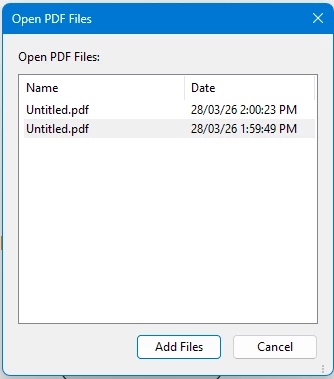
When the ‘add open files’ dialog box opens there isn’t any color contrast to show selected files.
The files in the list always appear the same.  Clicking on any one of the file or more than one (ctrl) doesn’t highlight anything.  Impossible to tell which files are selected or not selected.  In the attached image… both files are selected….
 

    2 replies

    Dave Creamer of IDEAS
    Community Expert
    Community Expert
    March 28, 2026

    I can’t replicate the problem on my system.

    What OS and Acrobat version?

    David Creamer: Community Expert (ACI and ACE 1995-2023)
    Curtis Gregson
    Participant
    March 29, 2026

    Windows 11 and Adobe Acrobat Pro DC Continuous Release - Version: 25.1.21288.0.  


    Dave Creamer of IDEAS
    Community Expert
    Community Expert
    March 29, 2026

    Not sure if it has anything to do with it, but what version of Windows 11?


    Acrobat:

    OR


    David Creamer: Community Expert (ACI and ACE 1995-2023)
    Karl Heinz  Kremer
    Community Expert
    Community Expert
    March 28, 2026

    Have you tried the accessibility settings in Acrobat’s preferences to see if that makes a difference? 

    Curtis Gregson
    Participant
    March 28, 2026

    Yes I have… the primary option in accessibility settings is for document attributes.  This seems to be an application attribute issue.  Very frustrating.  It just started behaving like this after a recent update.