
Participant
May 11, 2024
Answered

Adobe Acrobat Booklet Pages In Wrong Order

  • May 11, 2024
  • 1 reply
  • 1247 views

I have looked this up everywhere and I'm not getting a straight answer. I have my pages in multiples of 4, they're in the correct order when I view it as a normal PDF, and when i go to print it as a booklet, it's showing me pages like: 


3 45

4  46

5   47

I just want them to be in order 1-2 on one side, 3-4 on the other side and so on so forth. How can I fix this? I've tried everything and I don't know what to do.
This topic has been closed for replies.
Correct answer Abambo

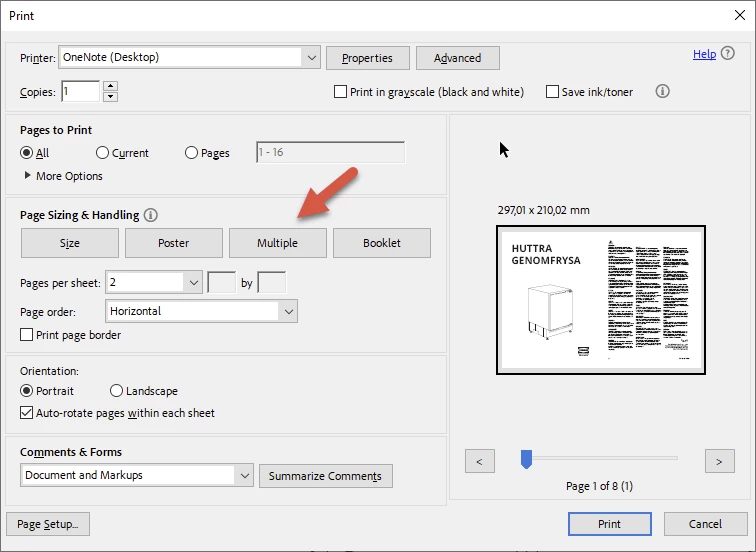
The booklet is printing correctly, as a booklet is what it says. A collection of sheets, folded in the middle and possibly also stapled. What you want to do is to print 2 PDF sheets on one page:


1 reply

Abambo
Community Expert
AbamboCommunity ExpertCorrect answer
Community Expert
May 11, 2024

The booklet is printing correctly, as a booklet is what it says. A collection of sheets, folded in the middle and possibly also stapled. What you want to do is to print 2 PDF sheets on one page:


ABAMBO | Hard- and Software Engineer | Photographer
MaruMe_Author
Participant
May 12, 2024

Thank you so much! That seemed to fix the problem. The only thing is it doesn't give me an option for what side of the binding since it's not on "booklet" mode. So most of the pages are in an orientation that makes the binding on the right whereas it should be on the left.