
Participating Frequently
May 3, 2024
Question

Adobe Acrobat DC 2015 License issue

  • May 3, 2024
  • 2 replies
  • 2622 views

I have a volume license for Acrobat DC 2015 that I have been using for the last 8 years.  We have it installed on approximately 40 computers and have a 50 license pack.  Adobe has verified that my serial number is active and valid, however we receieve the below pop up each time Acrobat is opened.
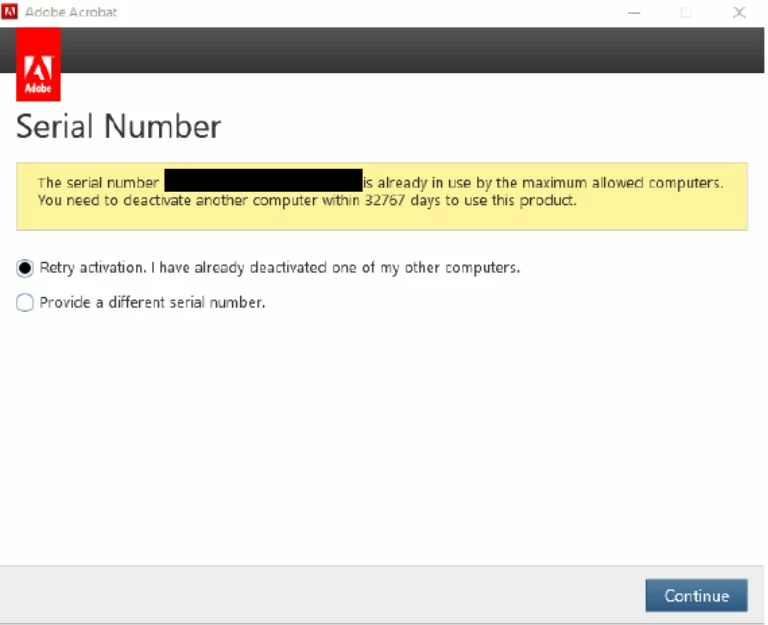


If I continue it fails, however I can close the pop up and continue working.  It comes back every few minutes and with each document opened.  

This topic has been closed for replies.

2 replies

Participating Frequently
May 8, 2024

When I try to activate, I receive the following


Participant
May 10, 2024

Any updates? I am having the same issue with Acrobat DC 2015. But I have not done any installs for this version. The user reported this issue out of the blue and getting both messages you have attached.

Participating Frequently
May 10, 2024

Unfortunately I don't have a single useful update.  I have spent several hours on the phone with support, but they are limited because the product is no longer supported.  I will make sure I update the post if I find a solution.

Abambo
Community Expert
Community Expert
May 3, 2024

As you have 50 licences, on how many computers did you install the licences? Did you before uninstalling, sign out the licence?

ABAMBO | Hard- and Software Engineer | Photographer
Participating Frequently
May 3, 2024

Over the years, it has been installed more than 50 times, but its currently installed on approximately 40 workstations or servers.  I never logged out when retiring a computer and it worked just fine until yesterday when we started receving this message.

try67
Community Expert
Community Expert
May 3, 2024

I guess they found out about it and blocked you from further exceeding your seat limit. You must deactivate/log out from any computer you want to retire! Maybe there's a way to deactivate all current seats and then re-activate them, though. You'll need to ask Adobe's enterprise support about that.